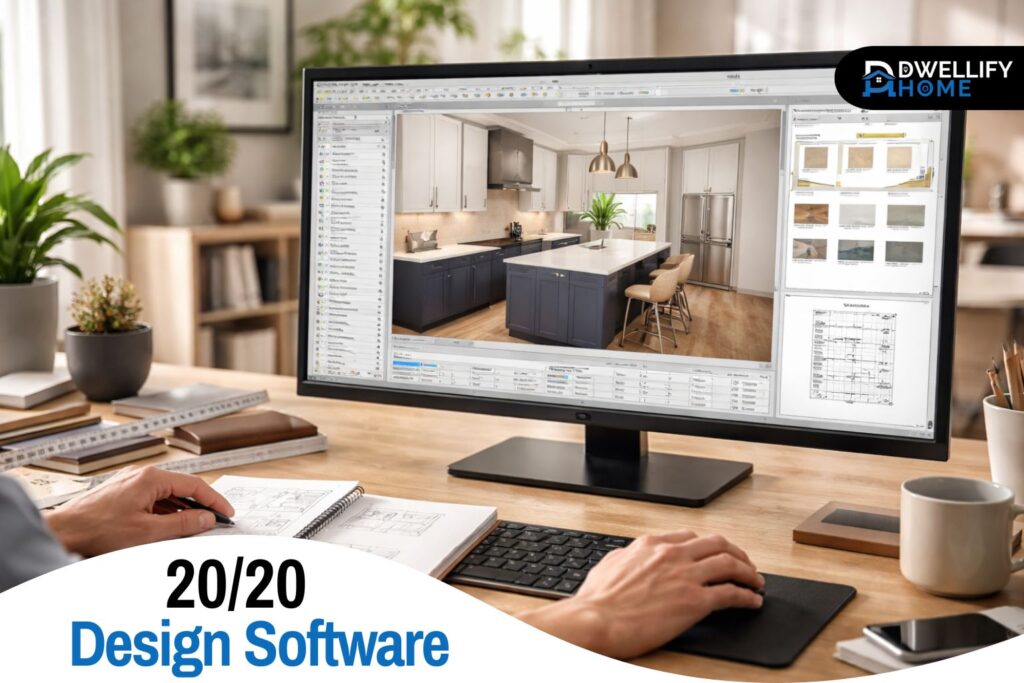
Walk into a kitchen showroom on a busy Saturday and you’ll see the same pattern: a designer listening closely, sketching quickly, then turning the conversation into a layout the client can actually picture. That last part is where 2020-style CAD tools earn their keep. They don’t just make something look nice. They help make sure it fits, can be ordered correctly, and won’t fall apart when real measurements show up.
20/20 design software is one of those tools people hear about through designers, cabinet dealers, or contractors, then look up when they want to understand what it does and whether it’s worth learning. This guide breaks it down in plain English, with the practical details that tend to matter once you’re past the marketing.
Snippet-Ready Definition:
20/20 design software is professional kitchen and interior design CAD used by designers and showrooms to create accurate layouts, realistic 3D renderings, and product-based quotes using manufacturer catalogs.
Mission Statement:
Dwellify Home helps homeowners make practical, stylish, and informed home and décor decisions through clear guidance and real-world design insights.
What Is 20/20 Design Software?
At its core, this software is professional CAD made for kitchens, baths, and related interior spaces. It’s built around a simple idea: design should be tied to real products, real sizes, and a workflow that supports selling and ordering, not just visualizing.
That’s why it’s common in cabinet showrooms and kitchen and bath studios. A layout isn’t only a 3D scene. It’s also a set of decisions that affect cabinet runs, fillers, appliance openings, clearances, and eventually a quote. When people use it well, it reduces the gap between “this looks good” and “this can be built.”
20/20 Design vs 2020 Design Live vs 2020 Design Flex
The naming trips people up because “20/20” is often used casually, while the product family is usually branded as 2020 Design Live and 2020 Design Flex (often referenced alongside other 2020 or Cyncly tools).
Here’s the practical difference:
- Design Live is the traditional desktop workflow many showrooms have relied on for years. It’s familiar, powerful, and catalog-driven.
- Design Flex leans into cloud-connected workflows and collaboration, with a modernized approach to working across projects and content updates.
In real-world terms, both can get you to a professional kitchen presentation. The better choice depends on how your team works, whether you need easier collaboration, and what kind of licensing and deployment fits your business.
Key Uses of 20/20 Design Software
- Create precise kitchen and bath layouts
- Generate realistic 3D renderings for client presentations
- Work with real manufacturer cabinet and appliance catalogs
- Produce project estimates and design documentation
- Plan space layouts with accurate measurements and clearances
What 20/20 Design Software Is Used For
Most people associate this software with kitchens, and that’s fair. It shines when you’re planning cabinet runs, appliance placements, and the “tight details” that make kitchens either comfortable or annoying to live in.
Common use cases include:
- Kitchen layout planning with accurate cabinet sizing, fillers, and appliance openings
- Bath layouts, especially when you need to respect door swings, clearances, and fixture spacing
- Closets or storage spaces, depending on the catalogs and modules available
- Floor plans and elevations for communicating design intent clearly
- Client-facing 3D views that help people make decisions faster
- Documentation for quoting and ordering, where product lists and specifications matter
A big reason pros use it is that it connects design with the commercial side of the job. That’s not glamorous, but it’s how projects stay profitable and accurate.
Key Features of 20/20 Kitchen Design Software
Professional 3D Rendering Tools
The 3D tools are there to help clients understand scale and finish combinations, not to win an animation contest. The best results usually come from good scene setup rather than endless tweaking.
A small, practical tip that improves presentations: pick camera angles that match how people actually stand in the room. Overly wide angles can make spaces feel bigger than they are, which is a fast way to create disappointment later.
Extensive Manufacturer Product Catalogs
Catalogs are a major reason this software is used in professional settings. Instead of “generic cabinet boxes,” you can work with manufacturer-specific products, sizes, and options. That matters when a client asks for a specific door style, a particular finish, or a storage accessory that changes cabinet interiors.
This is also where beginners get stuck: catalogs aren’t just libraries, they’re structured. Learning how to find items, configure options, and keep things consistent across a layout is a real skill.
Advanced Space Planning Tools
This isn’t a “drag furniture around” tool. It’s built for precision. That means the details you’d normally hand-wave in a concept sketch start to matter: wall dimensions, window placement, soffits, and even small bump-outs.
In practice, the accuracy pays off when you’re juggling a tight kitchen where every inch affects walkway width, refrigerator door swing, or landing space near a cooktop.
Design-to-Sales Workflow Tools
Many setups include tools that support quoting, budgeting, and proposal creation. In a showroom environment, that’s huge. It reduces the time between a design meeting and a client-ready presentation that includes a realistic estimate.
One thing I’ve seen help teams avoid mistakes: treat the first quote as a working draft, not a promise. Build in a habit of confirming appliance specs and site measurements before locking anything.
Cloud Integration and Content Updates
People often ask about 2020 Cloud and content updates because catalogs can change. In a product-based workflow, being current matters. Outdated items can lead to substitution issues, wrong pricing, or confusion when a manufacturer revises a line.
A steady, predictable update process is less exciting than a new rendering feature, but it’s one of the reasons professional studios stick with this ecosystem.
How Designers Use 20/20 Design Software in Real Projects
A clean workflow makes the software feel fast. A messy workflow makes it feel like it’s fighting you. Here’s what tends to work in real projects:
Start with the room shell. Get walls, openings, and key constraints right before you chase finishes. Doors, windows, ceiling height, soffits, and any fixed plumbing points should be in place early. That prevents the painful “everything shifts” moment halfway through.
Then build the layout in stages. Place major anchors first: fridge, sink, range, dishwasher, and tall storage. After that, fill in base cabinets, uppers, and details like panels and fillers. The goal is to solve function and fit, then make it look good.
Only after the plan is solid does it make sense to polish the presentation. That’s when lighting, camera angles, and material choices actually represent a real design instead of a nice picture.
System Requirements for 2020 Design Software
Performance is a common pain point, especially on laptops. Rendering and 3D views depend heavily on hardware, and the experience can vary a lot between “it runs” and “it runs well.”
Minimum and Recommended Hardware
At a practical level, you want enough RAM to keep projects responsive and a capable GPU for 3D and rendering. Storage matters too, especially if catalogs and project files live on a slow drive. If you’ve ever watched a catalog load one piece at a time, that’s usually the machine telling you it’s struggling.
Operating System Compatibility
Many professional CAD setups are Windows-first. If you’re on a Mac, this is where you need to slow down and check compatibility carefully before you invest time. Some teams use workarounds, but those add complexity, and complexity is where deadline stress lives.
Performance Tips for Smooth Rendering
When someone tells me the software feels slow, I ask three things before anything else:
- Are graphics drivers up to date?
- Is the project file bloated with unused views and heavy scenes?
- Is the machine running on integrated graphics when it should be using the dedicated GPU?
Those simple checks solve more “mystery lag” than people expect.
2020 Design Software Pricing and Licensing
Pricing is usually structured around professional licensing, and costs can feel high compared to hobby design tools. That’s because this is built for businesses that earn money from design, quoting, and product sales.
The best way to think about cost is in workflow value: how much time it saves, how many mistakes it prevents, and how well it supports selling and ordering. In a showroom, even a single avoided ordering error can justify a chunk of the investment.
Free Trial Availability
Most people should start with an official trial when available. A limited-time trial tells you more in a week than a dozen reviews ever will. You’ll immediately learn whether you like the catalog workflow, the learning curve feels manageable, and your computer can handle your typical projects.
Is There a Free Version of 20/20 Design Software?
This is where a lot of confusion comes from, especially with searches like 20 20 design software free download or 2020 kitchen design software free download full version. In the professional CAD world, truly free full versions are uncommon for straightforward reasons: licensing, support, and manufacturer catalogs are part of the product value.
Student and Educational Versions
If you’re in school or training, the student version or educational licensing route is often the legitimate way in. It’s also a good way to build portfolio projects without immediately paying professional rates.
If you’re learning on your own, treat education options as a stepping-stone. Focus on mastering layout accuracy, catalog navigation, and clean presentation scenes, not just pretty renders.
Why “Full Free Download” Versions Are Rare
Besides legality, there’s a practical risk: untrusted installers can be outdated, unstable, or unsafe. Even ignoring that, you can waste days troubleshooting a broken setup instead of learning the tool. For professional work, stability matters.
2020 Design Flex: The Cloud-Based Evolution
Design Flex often comes up when teams want a smoother, more modern workflow, especially around collaboration and content management. In practical terms, it aims to reduce friction: sharing work, keeping content current, and supporting teams that don’t all sit at the same desk every day.
If your workflow is mostly solo and stable, a traditional desktop approach can still work well. If you need easier collaboration, multi-user workflows, or a more connected ecosystem, Flex becomes more attractive.
Advantages of Using 20/20 Design Software
The biggest advantages aren’t flashy. They’re the reasons projects go smoother:
- Catalog-driven accuracy, so designs match real products
- Professional presentation, helping clients decide with confidence
- Clear documentation, which reduces miscommunication between sales, design, and install
- A workflow built for real jobs, not just concept visuals
In my experience, the teams who benefit most are the ones who treat it as a system: consistent templates, consistent naming, and consistent review steps before anything goes to a client.
Limitations to Consider Before Using It
The learning curve is real. People who expect an instant “home design app” experience often get frustrated. You’re learning a professional workflow, and that takes time.
Hardware requirements can also surprise people, especially for rendering. A machine that’s fine for spreadsheets and browsing can feel weak in 3D CAD. And if your goal is casual room planning, this can be more tool than you need.
Who Should Use 20/20 Design Software
This tool is a strong fit for:
- Professional kitchen and bath designers who need product accuracy and client-ready visuals
- Interior designers and remodelers who coordinate layouts with real products and clear documentation
- Cabinet manufacturers and showroom retailers who live inside the quote-to-order workflow
It’s less ideal for a homeowner who just wants to test paint colors and furniture layouts. In that situation, a simpler design tool or working with a designer who already uses 2020 tools is usually the smoother path.
Alternatives to 20/20 Design Software
Alternatives make sense when your needs are different. If you’re doing early concept design, mood boards, or general space planning, simpler tools can be faster and easier.
The key difference to watch is this: many alternatives are great at modeling, but not built around manufacturer catalogs and quoting. If your work depends on real cabinet lines and order-ready outputs, that’s the gap you’ll notice quickly.
Common Questions About 20/20 Design Software
Which is better, 2020 or AutoCAD?
They serve different purposes. 2020 Design focuses on kitchen and cabinet layouts using real product catalogs, while AutoCAD is a general drafting tool used for architectural and engineering drawings.
Is there a free version of 2020 Design software?
A permanent free version is not typically available. Some users access a limited trial or a student version through educational licensing programs.
What program does Joanna Gaines use?
The exact software used by Joanna Gaines is not publicly confirmed. Designers working on similar projects often use tools like SketchUp, AutoCAD, or catalog-based programs such as 2020 Design.
Is 2020 Design software still relevant?
Yes. Many kitchen and bath showrooms still rely on it because of its manufacturer catalogs, design-to-sales workflow, and ability to generate realistic client presentations.
Can beginners learn 20/20 kitchen design software?
Yes, but it takes some practice. Beginners usually start by learning room setup, cabinet placement, and catalog navigation before moving on to rendering and advanced features.
Conclusion
The most helpful way to think about this category of software is simple: it’s for turning real products into real layouts that can be presented, quoted, and built with fewer surprises. Used well, it supports better decisions for both designers and clients, especially in kitchens and baths where small mistakes get expensive.
Before you invest time and money, get clear on your goal, check your computer against the 2020 design software requirements, and try an official trial or student option if you qualify. That hands-on week will tell you more than any feature list, and it’ll make it obvious whether this workflow fits how you want to design.
Disclaimer:
Content on Dwellify Home is for informational purposes only and should not replace professional design or construction advice. Always confirm specifications with qualified professionals before making final decisions.

I’m Bilal, the founder of Dwellify Home. With 6 years of practical experience in home remodeling, interior design, and décor consulting, I help people transform their spaces with simple, effective, and affordable ideas. I specialize in offering real-world tips, step-by-step guides, and product recommendations that make home improvement easier and more enjoyable. My mission is to empower homeowners and renters to create functional, beautiful spaces—one thoughtful update at a time.