The first time most homeowners notice that small Adtran box on the wall, it’s usually because something stopped working or they’re rearranging a room. I’ve installed, replaced, and troubleshot these units in hundreds of homes over the years, and the same questions come up almost every time. So let’s clear it all up in plain language, the way I’d explain it standing in your hallway.
Snippet-Ready Definition
The Adtran box plugged into the wall is an Optical Network Terminal (ONT), a device installed by your fiber internet provider that converts fiber-optic light signals into Ethernet your router can use.
Mission Statement
Dwellify Home helps homeowners make practical, stylish, and informed decisions about the spaces and systems that shape everyday living — from décor choices to the everyday equipment running quietly in the background of a modern home.
Key Things to Know About Your Adtran ONT
- Converts fiber light signals into Ethernet for your router
- Acts as the boundary between your ISP’s network and your home
- Owned and maintained by your internet provider, not you
- Some models also support landline phone service
- The green fiber connector should never be unplugged
What Is the Adtran Box Plugged Into the Wall?
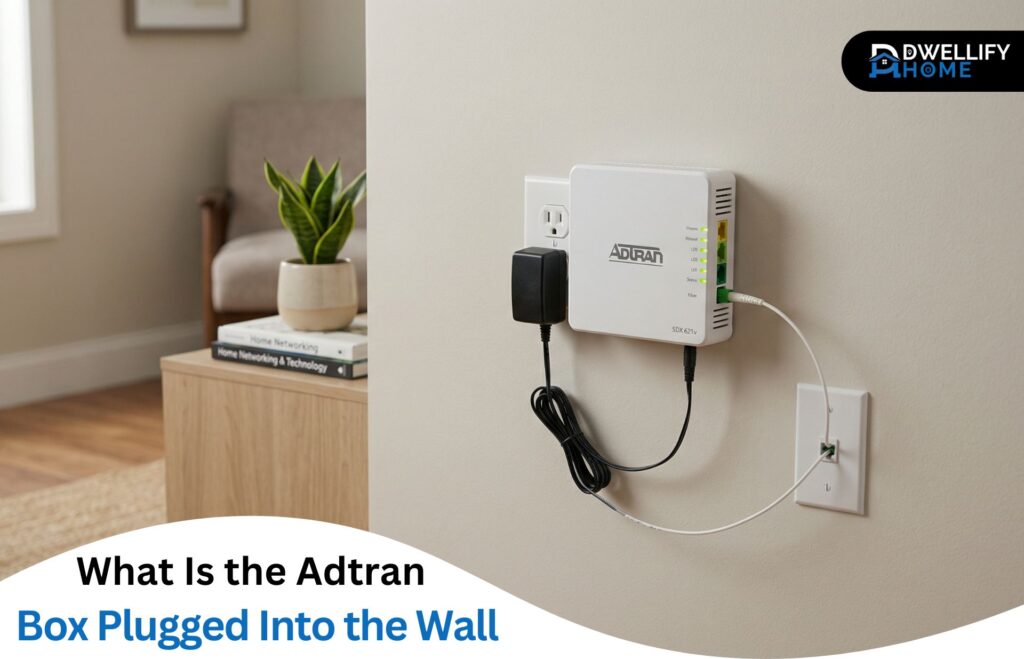
That little device is an Optical Network Terminal, or ONT for short. Some folks call it a fiber modem or fiber jack, but ONT is the proper name. Adtran is just the brand — they’re one of the bigger manufacturers fiber providers rely on.
Your internet service provider installed it when fiber was first activated at your address. It’s the box that takes the fiber line coming in from the street and turns it into something your home equipment can actually use.
What the Adtran ONT Actually Does
The job of the ONT is honestly more impressive than it looks. Fiber-optic cables carry data as pulses of light, and none of your devices speak that language. The Adtran box translates those light signals into electrical Ethernet signals your router understands.
It also serves as the demarcation point — the official line where your ISP’s network ends and your home network begins. Anything wrong on the street side is their responsibility. Anything past the ONT is yours.
A few Adtran models, especially in the 411 and 600 series, also have a phone jack on the back. That’s there to support landline service running over the fiber connection, which still matters to plenty of households.
Adtran ONT vs. Modem vs. Router: Clearing Up the Confusion
This is where I see the most mix-ups. A traditional modem works with cable or DSL lines. A router creates your Wi-Fi and shares the connection with your devices. The ONT is neither of those — it’s a fiber-to-Ethernet converter.
You can’t replace your ONT with a regular modem, and it doesn’t broadcast Wi-Fi on its own. It needs a router connected to it for that. Think of the ONT as the translator and the router as the distributor.
How the Adtran Box Fits Into Your Home Network
The flow is simple once you see it laid out:
- Fiber line from the street enters your home
- It plugs into the green port on the Adtran ONT
- An Ethernet cable runs from the ONT to your router
- Your router handles Wi-Fi and wired devices throughout the house
If any link in that chain breaks, the whole connection goes down. That’s why placement and cable quality matter more than people realize.
Common Adtran ONT Models Found in Homes
The models I run into most often are the Adtran 411 and 424RG. These are compact micro ONTs, usually mounted right next to a wall outlet because they need power nearby. They’ve been around for years and are reliable workhorses.
The newer Adtran SDX 600 series is what you’ll see on gigabit and multi-gig fiber plans. They’re sleeker, run cooler, and handle higher speeds without breaking a sweat. You can usually spot the model number on a sticker on the bottom or side of the unit.
Where the Adtran Box Is Usually Installed
ONTs end up in spots that aren’t always convenient. Common locations include a hallway closet, the garage wall, a basement utility area, or near the main electrical panel. The technician picks the spot based on where the fiber line enters and where a power outlet sits nearby.
If yours is buried in a closet behind boxes, it’s worth keeping that area clear. These units generate a little heat, and they don’t like being suffocated.
Internet Providers That Use Adtran ONTs
Adtran equipment shows up across a lot of fiber networks, including AT&T Fiber, CenturyLink, Frontier, and several regional providers. If you’ve been wondering what the Adtran box plugged into the wall Spectrum customers sometimes see — that’s tied to Spectrum’s expanding fiber rollout, where Adtran ONTs are deployed in newer fiber-to-the-home installations rather than the older coaxial setups.
The brand on the box doesn’t change how it works. The ISP just configures it to talk to their network.
Understanding the Lights on Your Adtran ONT
The LED indicators tell you everything you need to know at a glance. Here’s the quick reference I give homeowners:
- Power: Solid green means the unit has electricity. Off means check the adapter.
- Optical (or PON): Solid green means a healthy fiber connection. Red or off usually means a fiber issue.
- LAN: Solid or blinking green means your router is talking to the ONT.
- Alarm: Should be off. If it’s red, something’s wrong — usually the fiber side.
A blinking optical light during startup is normal. A steady red alarm is not.
Is It Safe to Unplug the Adtran Box?
Power cycling is fine and sometimes necessary. What you should never do is touch the green fiber connector on the side or back of the unit. That fiber tip is incredibly sensitive — even a speck of dust on it can degrade your signal or knock you offline completely.
When the ONT is off, your internet stops, and so does any landline service running through it. Keep that in mind before pulling the plug during work hours.
How to Reboot Your Adtran ONT the Right Way
The steps are straightforward:
- Unplug the power cable from the side of the ONT
- Wait a full 15 seconds — don’t rush it
- Plug it back in and let the lights settle for one to two minutes
That’s it. No buttons to press, no settings to reset. Most minor hiccups clear up with this alone.
Troubleshooting Common Adtran ONT Issues
A few patterns I see often:
- Power light on but no internet: Usually a router issue, not the ONT. Reboot the router first.
- Red alarm light: Almost always a fiber-side problem. Call your ISP.
- Optical light off: The fiber signal isn’t reaching the unit. Check that nothing has bent or pinched the fiber line, then call support.
- Everything looks normal but speeds are bad: Test with an Ethernet cable directly into the ONT to rule out your router.
A good rule of thumb: if rebooting both the ONT and the router doesn’t fix it within 10 minutes, it’s time to contact your provider.
Do You Own the Adtran Box, or Does Your ISP?
The ONT belongs to your internet provider, not you. They install it, maintain it, and replace it when it fails. If you move out, leave it on the wall. If it breaks through normal use, they’ll swap it at no cost. Damaging it on purpose is another story.
Can You Replace the Adtran Box With Your Own Equipment?
Not really. ONTs are tied to the provider’s network and provisioned specifically for your account. Unlike cable modems, there’s no retail market for fiber ONTs you can just plug in.
What you can absolutely upgrade is your router. A better router or a mesh Wi-Fi system will do far more for your home internet experience than anything you could change about the ONT itself.
How to Keep Your Adtran ONT Running Reliably
A few habits that genuinely extend the life of these units:
- Give it breathing room — don’t stack things on top of it
- Plug it into a surge protector, especially in storm-prone areas
- Keep the fiber connector covered if it ever gets disconnected
- Don’t yank cables or move the unit without unplugging power first
Most ONTs run for years without trouble when they’re treated reasonably.
When to Contact Your Internet Provider About the Adtran Box
Call your ISP when you see a steady red alarm light, when the optical light won’t come on after a reboot, or when your internet stays down even after both the ONT and router have been restarted. Have your account number ready, plus a quick description of which lights are on and which aren’t. That single detail saves a lot of back-and-forth.
Frequently Asked Questions
What is an Adtran box?
An Adtran box is an Optical Network Terminal (ONT) made by Adtran. It’s the device your fiber internet provider installs to bring the fiber connection from the street into your home network.
Does a Wi-Fi router just plug into the wall?
No. A Wi-Fi router needs to connect to a modem or, in fiber setups, an ONT like the Adtran box. The router itself only plugs into a power outlet and the ONT, not directly into a data wall jack.
What is an Adtran device used for?
Adtran devices are used to deliver fiber internet service to homes and businesses. The ONT specifically translates fiber-optic signals into Ethernet so your router and devices can connect to the internet.
Is Adtran a modem or a router?
Neither, technically. The Adtran box is an ONT, which is closer in function to a modem but designed for fiber lines. It doesn’t broadcast Wi-Fi, so you still need a separate router connected to it.
Why is there an alarm light on my Adtran ONT?
A red alarm light usually means a fiber-side issue your ISP needs to fix. Try rebooting the unit first, and if the light stays red, contact your provider.
Final Thoughts
So that’s the full picture of the Adtran box plugged into the wall — a quiet little translator doing the heavy lifting between fiber light signals and your everyday internet. It’s not glamorous, but it’s the reason your Wi-Fi works at all on a fiber connection.
Treat it gently, keep the area around it clear, learn what its lights mean, and you’ll rarely have to think about it again. And the next time someone in your house asks what that strange box on the wall is, you’ll have a real answer ready.
Disclaimer
The information in this article is for general guidance only. For hardware-specific issues, account questions, or repairs, always contact your internet service provider directly.

I’m Bilal Hassan, the founder of Dwellify Home. With 6 years of practical experience in home remodeling, interior design, and décor consulting, I help people transform their spaces with simple, effective, and affordable ideas. I specialize in offering real-world tips, step-by-step guides, and product recommendations that make home improvement easier and more enjoyable. My mission is to empower homeowners and renters to create functional, beautiful spaces—one thoughtful update at a time.