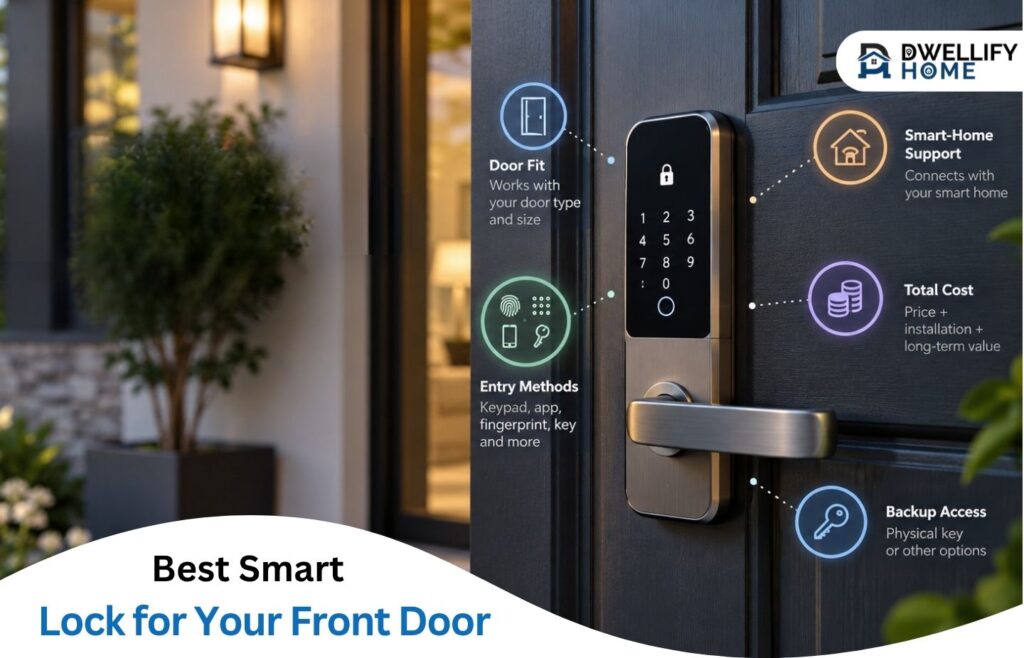
A front-door smart lock should make coming home easier. It also needs to fit your door, work with your household, and give you a clear backup way inside.
For a premium replacement, Schlage Encode Plus is a strong starting point if you want a keypad, physical key, and built-in Wi-Fi. Choose eufy C210 for a lower-cost Wi-Fi option, or Yale Approach to keep compatible exterior hardware and keys. The best smart lock for your front door depends on fit first, then your entry method and smart-home setup. No single model suits every home.
Direct Answer
Schlage Encode Plus is a strong premium replacement option; eufy C210 offers lower-cost Wi-Fi entry. Choose the model that fits your door, supports your daily routine, and provides workable backup access.
Practical Home Tip
Before you buy, turn your current deadbolt with the door closed. If you need to push, pull, or lift the door, resolve the fit problem first. A smart lock still needs the bolt to move smoothly.
Mission Statement
DwellifyHome helps homeowners and renters make informed, practical choices for stylish, comfortable homes.
Before you buy:
- Confirm door measurements and the exact lock variant.
- Choose your everyday entry method.
- Check smart-home support and required hubs or bridges.
- Add accessory and installation costs.
- Verify backup entry and any required rental permission.
Quick Comparison: Smart Locks for Different Homes
Use this shortlist to narrow your choices before comparing extra features. The picks reflect published specifications and practical trade-offs, rather than hands-on testing by DwellifyHome.
| Smart lock | Who it suits | Useful entry options | Main buying check | Listed US price |
| Schlage Encode Plus | Homeowners wanting a premium keyed replacement | Keypad, physical key, Apple Home Key | Door fit and budget | $329 |
| Kwikset Halo Select | Buyers choosing between Wi-Fi and Matter | Keypad, physical key, app | Features differ by connection mode | Check current retailer price |
| Aqara U400 | Compatible Apple users wanting hands-free entry | Fingerprint, keypad, key, home key, UWB | Compatible Apple hardware and hub | $269.99 |
| eufy C210 | Buyers wanting lower-cost Wi-Fi access | Keypad, physical key, app | No Apple HomeKit or Matter support | $99.99 |
| Yale Approach with Keypad Touch | Renters or owners retaining compatible exterior hardware | Existing key, separate keypad, fingerprint | Existing deadbolt, permission, and bundle | $239.99 |
| Level Lock Pro | Buyers wanting a traditional-looking replacement | Physical key, Apple Home Key, app | Door dimensions and optional accessories | $349 |
Prices were checked on October 6, 2026. They are product listing prices, before tax, installation, and separately purchased accessories. Finish, seller, promotions, and stock can change the total. Schlage’s US product page lists Encode Plus from $329; the other priced options are detailed below.
Which Smart Lock Should You Choose?
Schlage Encode Plus: A Premium Option With Key Backup
Schlage Encode Plus suits someone who wants several familiar ways to enter. You can use a code, carry the included physical key, or use Apple Home Key with compatible Apple devices. Built-in Wi-Fi supports remote management through the Schlage Home app.
That makes it worth considering for a household with different preferences. For example, one person may tap a watch while another prefers a key or code.
The trade-off is price. If you will mainly use a keypad, compare cheaper options before paying for Apple features. Also check the exact name: Encode and Encode Plus are different models. Use the Encode Plus specifications for your purchase, rather than a generic Schlage listing.
Kwikset Halo Select: An Option With Wi-Fi or Matter
Kwikset Halo Select is useful if you want a keypad and key backup, with a choice of connection methods. Wi-Fi supports the Kwikset app without an added hub for that connection. Matter-over-Thread offers another route into compatible smart-home platforms.
The important detail is that you choose Wi-Fi or Matter operation. Do not assume every Kwikset app feature carries across when you change modes. Check the features your platform supports, especially guest-code management and door alerts.
The Halo Select product page also describes a door sensor and SmartKey rekeying. Choose it for the features you will use, after checking current price and connection requirements. Halo Select and Halo Select Plus should not be treated as interchangeable listings.
Aqara U400: Hands-Free Entry for Compatible Apple Setups
The Aqara U400 is worth considering when arriving with full hands is a daily problem. Its UWB feature uses short-range positioning to support hands-free unlocking with compatible Apple devices. It also provides fingerprint, keypad, physical-key, and Apple home key entry.
The US U400 listing showed $269.99 for Black and Silver variants. Its standout feature has specific device and hub requirements, so check those before buying. A phone being an iPhone does not by itself confirm UWB compatibility.
In his U400 review for Tom’s Guide, Christian de Looper reported generally consistent hands-free unlocking, with occasional short delays during watch-only use. That supports its convenience appeal, while giving you a reason to keep another entry method ready.
eufy C210: A Lower-Cost Wi-Fi Option
The eufy C210 suits a buyer who wants code entry and remote app control at a lower listed price. The C210 product page showed $99.99, with built-in Wi-Fi, keypad entry, and physical keys.
Its main limit is ecosystem support: eufy says C210 does not support Apple HomeKit or Matter. An Apple Watch app feature should not be confused with Apple Home Key.
For example, it may fit a household happy to use the eufy app and keypad. Choose another option if direct Apple Home integration is essential. Check the installation requirements too; a low price does not make an unsuitable door compatible.
Yale Approach: Keep Your Existing Exterior Lock and Keys
Yale Approach is a retrofit lock: it changes the inside hardware while retaining a compatible exterior deadbolt and key. That is useful when you like your current finish or need to preserve existing key access.
The Wi-Fi and Keypad Touch bundle was listed at $239.99. Its separate keypad adds codes and fingerprint entry. Verify current stock with the seller before ordering.
A renter should still check the lease and get any required permission. Keeping the outside unchanged does not automatically make an alteration acceptable.
If you want a full replacement instead, Yale Assure Lock 2 Touch is a separate fingerprint option. Read the exact variant carefully: Standard, Touch, and Plus models do not all offer the same entry features.
Level Lock Pro: A Traditional Look With Smart Features
Level Lock Pro suits someone who wants smart access without a large outside keypad. It replaces the deadbolt while keeping a traditional-looking design. It does not preserve your existing lock in the way an interior retrofit does.
The Level Lock Pro specifications list $349, Apple Home Key, Matter-over-Thread, and physical keys. A separate keypad is optional, so add its cost if visitors need code entry.
Check dimensions closely. Level lists a 1¾–2-inch door-thickness range and a 2⅛-inch main bore hole. This is a good example of why a neat appearance should come after a fit check. For remote use, confirm whether your chosen setup needs a compatible hub or Level Connect bridge.
Check Your Front Door Before You Buy
Start with the lock already on your door. A deadbolt is a bolt lock, often separate from the handle. A single-cylinder version has a key outside and a thumbturn inside. A smart deadbolt replacement and an interior retrofit solve different installation needs. A door with only a knob lock, or with a different lock system, needs separate compatibility advice.
Record these details and compare them with the exact model’s instructions:
- Door thickness: Measure across the door edge, excluding decorative trim.
- Backset: The distance from the door edge to the center of the main lock hole.
- Bore holes: Check the required openings through the door face and edge.
- Clearance: Look for trim, glass, a lower handle, or a storm door that could block the hardware.
For example, Schlage lists a 1⅜–1¾-inch thickness range for Encode Plus, with a 2⅜- or 2¾-inch backset. Those measurements are model-specific; they are not a promise that every lock in this guide fits the same door.
Next, operate your existing deadbolt with the door closed. Notice whether it moves easily or needs the door lifted, pushed, or pulled. A binding bolt is a door or hardware issue worth resolving before adding a motorized lock.
Do not drill or enlarge openings based on a general buying guide. Follow the exact installation instructions and consult a locksmith when the door preparation or hardware is unsuitable.
Also check the lower handle. If it has a separate lock, unlocking the smart deadbolt alone may still leave you needing another key. For a rental, confirm permission before changing hardware or mounting a keypad.
Choose Your Entry Method and Smart-Home Connection
Keypad, Fingerprint, Tap, or Hands-Free Entry?
Choose the method that makes an ordinary weekday easier.
A keypad gives household members and guests a way in without handing over your phone. A fingerprint reader may reduce the steps needed to enter. Tap entry lets compatible users present a phone or watch. Hands-free entry adds device, setup, and permission requirements that deserve a closer check.
Think about visitors as well as yourself. For example, a dog walker may need a temporary code, while a family member may prefer a physical key. Check whether the exact lock and chosen app support the access schedule you need.
Keep backup access in the decision. A fast entry method is helpful, but you should know what to use if it is unavailable. Do not assume a fingerprint reader, app, or proximity feature will be your only needed method.
Wi-Fi or Matter-over-Thread?
Built-in Wi-Fi can simplify remote access when a lock connects directly to your home network. Confirm the required Wi-Fi band and usable signal at the front door before buying.
Matter is a shared smart-home standard. Thread is the wireless network used by some Matter locks. For the Matter-over-Thread options here, check the required controller and Thread border router. The border router connects the Thread network to your home network. These functions may be combined in one compatible hub, but an ordinary router or any smart speaker is not automatically suitable.
Read the Kwikset Matter compatibility guide for platform-specific features. For Aqara U400, the manufacturer requirements distinguish general Matter support from Apple UWB unlocking.
Apple Home compatibility, Apple Home Key tap entry, and UWB hands-free entry are different features. The U400’s published UWB requirements include a Thread-enabled Apple Home hub and supported iPhones or Apple Watches, with listed software requirements and exclusions. Check the current device list rather than relying on a broad Apple-compatible badge.
If your home already has connected lighting or sensors, our smart home design guide can help you plan how entry fits the rest of your routine.
Compare the Complete Setup Cost
Compare the setup you will actually use, not just the least expensive version of a product.
Ask whether the quoted price includes your keypad, Wi-Fi bridge, required hub, and preferred entry features. A lock-only listing and a fingerprint-keypad bundle are different purchases. Count equipment you already own only after confirming compatibility.
For example, the $99.99 C210 listing describes built-in Wi-Fi. Level Lock Pro lists an optional separate keypad. The difference matters if everyone in your home needs code entry. Compare those complete configurations, then add tax and any delivery costs.
Installation should be a separate line in your budget. A straightforward compatible swap and a door needing repairs are different jobs. Ask a locksmith for a quote if the existing hardware binds or the door needs changes; there is no useful universal installation price for those situations.
If the lock is part of a larger project, our smart home remodeling guide can help you plan related upgrades before spending.
Plan Your Backup Entry Before You Need It
An internet outage, dead phone, and dead lock battery are different problems. Make a plan for each.
During an internet outage, remote app functions may become unavailable. Local entry can still work where the model supports it. For example, Schlage’s outage guidance confirms that stored codes and Apple Home Key can operate on Encode Plus without internet access, while the lock has battery power.
If your phone dies, a keypad or physical key gives you another route. Keep that method available to the people who need it, rather than relying on one person’s charged phone.
If the lock batteries die, a keypad also needs power. Use the model’s documented backup method. The C210 has physical keys and an emergency power port; eufy explains that the port supplies emergency power rather than charging the lock’s batteries.
Respond to low-battery alerts before they become an entry problem. Keep the specified replacement batteries or charging arrangement ready, and follow the maker’s battery guidance. Do not transfer one model’s battery-life estimate to another.
Before depending on the lock, test your chosen backup method safely. Keep a working key or another confirmed entry route available while checking electronic functions. Avoid arranging a test that could leave you locked out.
Set Up and Check Your Smart Lock
Check the Door and Bolt
Use the manual for the exact model and install its specified hardware. Parts that look similar can still have different requirements.
Follow the manufacturer’s initial setup and testing sequence. Watch for smooth bolt movement and a clear confirmation of the lock state. Then check operation with the door closed, keeping backup access available.
If the lock works with the door open but binds when closed, investigate alignment before repeatedly running the motor. Schlage’s troubleshooting guidance identifies door preparation and obstruction as possible causes. Get help with a damaged frame, unsuitable opening, or persistent binding.
Remember that “locked” and “door closed” are different information. A bolt can extend while a door is open. If your model has a door sensor, set it up as instructed and check that open/closed status changes correctly.
Check Access and Account Settings
Test the entry methods your household will use. Create a guest’s access through the supported process, check that it works, then confirm you can remove it. Verify remote operation separately if you bought the lock for that purpose.
Use a unique account password, enable multifactor authentication—an extra sign-in check—where offered, and keep the app and lock software updated. Give guests suitable access instead of sharing the owner’s password. These steps follow CISA’s basic online-security guidance.
Physical security matters too. BHMA residential letter grades assess security, durability, and finish. Read the exact rating rather than treating AAA and numerical grades as identical labels. A rating does not guarantee that the entire door, frame, or connected account is secure.
Frequently Asked Questions
Can Two Exterior Doors Use the Same Physical Key?
Sometimes, but check the exact lock and key system before buying. A retrofit can preserve the key access you already have. A replacement may need compatible rekeying or a keyed-alike ordering option. For example, Halo Select describes SmartKey rekeying. Ask the manufacturer or a locksmith whether your selected locks can share a key.
Is a Basic Keypad Lock Enough if I Don’t Need Remote Access?
It may be. If your main goal is entering with a code, compare a basic electronic keypad lock with a connected smart lock. Decide whether you also need away-from-home control, app-based guest management, or smart-home routines. Choose based on those needs, rather than paying for connectivity simply because it is available.
Do I Need a Smart Lock With a Built-In Camera?
Only if viewing visitors is part of your goal. A lock controls entry; video features serve another purpose. Facial-recognition hardware does not automatically provide video-doorbell functions. Lockly’s Visage and Vision comparison illustrates that distinction. Compare recording, placement, and any ongoing costs separately before choosing a combined device.
Can I Take a Retrofit Smart Lock With Me When I Move?
Check your rental agreement, the product’s removal instructions, and the next door’s compatibility. Retaining exterior hardware may make a retrofit appealing, but it does not guarantee reuse on another deadbolt. Before handing over a home, follow the maker’s instructions for account access and ownership changes, and arrange any required return to the original hardware.
Choose Your Lock and Make the Final Checks
Measure your door, choose your everyday entry method, and confirm the exact bundle. Then check required accessories and backup access before ordering. A smart lock earns its place by fitting your home and making daily entry easier, with a clear plan for the times when your usual method is unavailable.
Disclaimer
Homes, doors, budgets, and access needs vary. Confirm the exact model’s instructions and compatibility before buying or installing a lock. Consult a qualified locksmith if the door or hardware needs repair or modification.