Most kitchen panic calls I get start the same way — someone flipped the switch, the disposal made a click or nothing at all, and now the sink is full of food scraps with nowhere to go. Nine times out of ten, the fix is sitting underneath the unit waiting to be pressed. That little reset button has saved more disposals than any tool I carry in my truck, and once you know how to use it, you’ll rarely need a plumber for routine trips.
This guide walks you through where the button is, how to use it the right way, and what’s really going on when pressing it doesn’t bring your unit back to life.
The Short Answer
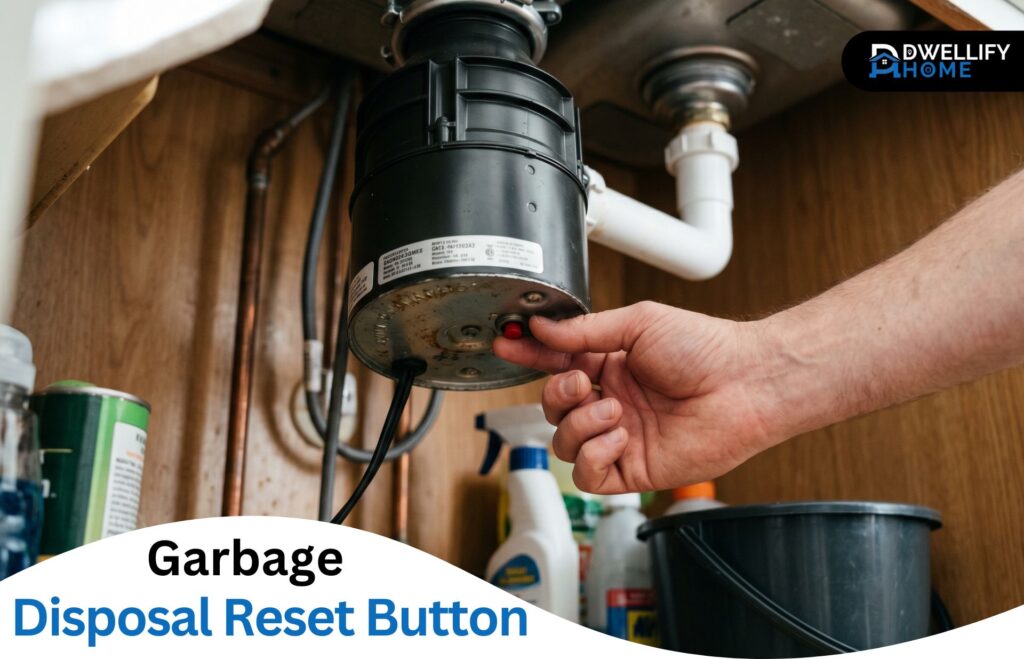
The garbage disposal reset button is a small thermal overload switch on the bottom of the unit that cuts power when the motor jams or overheats. Pressing it back in restores power once the cause is cleared.
Mission Statement
At Dwellify Home, we help homeowners make practical, confident, and informed decisions about their living spaces — from everyday home solutions and modern décor to gardens, lifestyle, and property care. Our goal is to share clear, real-world guidance that makes home ownership feel simpler and more rewarding.
What the Garbage Disposal Reset Button Actually Does
The reset button is a small thermal overload protector built into the bottom of the unit. It works like a mini circuit breaker — when the motor draws too much current or runs too hot, the button pops out and cuts the power before anything burns out.
You’ll usually see it trip after a jam, after grinding too much fibrous waste at once, or when the disposal runs dry without water. It’s a safety feature, not a fault. The fact that it tripped means it did its job and protected a much more expensive part — the motor.
Key Things to Know at a Glance
- The reset button is usually a small red or black button on the bottom of the disposal
- It pops out when the motor overheats, jams, or draws too much current
- Always turn off the power before pressing it
- Wait 10 minutes if it won’t stay latched — the motor needs to cool
- A button that keeps tripping points to a deeper jam, motor issue, or end-of-life unit
Quick Diagnostic Guide
| Symptom | Most Likely Cause | First Step |
| Disposal completely silent | Tripped reset button | Press reset button |
| Motor hums, no grinding | Jammed flywheel | Use Allen wrench, then reset |
| Reset won’t stay in | Motor still hot or jammed | Wait 10 minutes, clear chamber |
| Reset trips repeatedly | Failing motor or short | Stop using, call a plumber |
| Dishwasher also dead | Tripped circuit breaker | Check electrical panel |
Where the Reset Button Is Located on a Garbage Disposal
The Standard Spot on Most Models
On nearly every modern unit, the reset button sits on the bottom face of the disposal — the flat side pointing toward the floor. Open the cabinet under your sink, get low, and look straight up. You’ll usually need a flashlight because most disposals are tucked into a tight cabinet space.
A few models place it on the lower side of the unit instead of the bottom, especially compact builds. If you can’t see it on the underside, run your finger around the lower third of the housing.
How to Spot a Tripped Reset Button (Popped-Out Look)
A tripped button sits visibly raised — usually about a quarter inch out from the housing. When it’s seated normally, it sits flush. That small gap is your signal. If it’s popped, the disposal has no power until you press it back in.
Quick Notes on Reset Button Color and Shape
Most reset buttons are red, though some manufacturers use black. The shape is almost always round and roughly the size of a pencil eraser. Anything that color and size on the underside of the unit is what you’re looking for.
Signs Your Garbage Disposal Needs a Reset
The Disposal Won’t Turn On at All
Dead silence when you flip the switch is the most common reset symptom. No hum, no click, no noise. The thermal protector cut the power completely, and the motor isn’t receiving anything from the wall switch.
The Motor Hums But Won’t Grind
Humming with no grinding usually means a jam, not a tripped reset. The motor is getting power but the flywheel can’t turn. Leave the switch on too long in this state and the reset will trip on its own to save the motor — which is actually what you want.
The Unit Suddenly Stopped Mid-Use
A unit that quits halfway through a load of food scraps almost always points to overheating. You overloaded it, or fed it too fast, and the thermal switch shut things down. Wait, reset, and feed it slower next time.
Safety Steps to Take Before Pressing the Reset Button
Before you touch anything under that sink, kill the power at the wall switch. If your unit plugs into an outlet under the sink, unplug it. For hardwired units, flip the breaker labeled “disposal” or “kitchen” in your electrical panel.
Never put your hand inside the grinding chamber — even with the power off. If something needs to come out, use long-handled tongs or pliers. A flashlight, a 1/4-inch Allen wrench, and a pair of pliers will cover almost every reset job you’ll ever do.
How to Use the Garbage Disposal Reset Button (Step by Step)
Step 1 – Turn Off the Power at the Switch or Breaker
Flip the wall switch off first. If you’ve already had the unit humming or struggling, also unplug it or turn off the breaker. This protects you from an accidental restart while your hands are near the unit.
Step 2 – Find the Reset Button Underneath the Unit
Crouch under the sink with a flashlight pointed up at the bottom of the disposal. Look for that red or black button on the underside. If it’s popped out, you’ve found your problem.
Step 3 – Press the Button Until It Clicks and Stays In
Push it firmly with your thumb until it sits flush with the housing. You should feel a small click. The button doesn’t need to be held down — once it stays in place, it’s done its job.
Step 4 – Wait 10 Minutes If It Won’t Stay Latched
When the button refuses to stay in or pops back out the moment you press it, the motor’s still too hot. Step away for about ten minutes. Trying to force a reset on a hot motor only causes another instant trip.
Step 5 – Restore Power, Run Cold Water, and Test
Turn the power back on at the switch or breaker. Run a steady stream of cold water into the sink, then flip the disposal switch. A healthy reset gives you a smooth, even hum and normal grinding sound — no rattling, no straining, no burning smell.
What to Do If the Reset Button Doesn’t Work
Clear Visible Debris from the Grinding Chamber
Shine a flashlight down the drain. You’d be surprised how often I find a bottle cap, a piece of silverware, or a fruit pit sitting on the flywheel. Pull anything visible out with pliers — never with your fingers.
Use an Allen Wrench to Free a Stuck Flywheel
Most disposals have a hex-shaped hole in the very center of the bottom. A 1/4-inch Allen wrench fits it. Insert the wrench, rotate it back and forth a few times until you feel the flywheel break free, then try the reset button again.
Check the Wall Switch, Outlet, and Circuit Breaker
If the reset’s seated and the flywheel turns freely, the issue may be upstream. Test the outlet under the sink with a phone charger or lamp. Check your home’s breaker panel for a tripped kitchen circuit. A bad wall switch is a common culprit too — they wear out faster than people expect.
Why the Reset Button Won’t Stay In or Feels Loose
The Motor Hasn’t Cooled Down Yet
This is the most common cause and the easiest fix. Internal thermal switches need physical cooling time before they’ll allow current to flow again. Ten to fifteen minutes is usually enough.
The Jam Hasn’t Been Fully Cleared
If anything is still binding the flywheel, the reset will trip again the second power tries to flow. Clear the chamber completely and turn the flywheel manually before trying the button again.
A Loose, Worn, or Damaged Reset Button
A reset button that feels loose, mushy, or wobbly is past its life. Years of trips and presses can wear out the internal contact. At that point, the button isn’t reliable anymore even if it looks fine.
A Possible Electrical Short Inside the Unit
A button that won’t stay seated even with the motor cool and the chamber clear usually points to an electrical fault inside the unit. That’s a safety concern, not a DIY fix. The unit needs replacement at that point.
Why the Reset Button Keeps Tripping
Overloading and Overheating
Feeding too much waste at once is the leading cause of repeat trips. The motor heats up faster than the unit can dissipate it, and the thermal protector keeps stepping in. Smaller portions and steady cold water solve this almost completely.
Hidden Jams or Foreign Objects
Sometimes a small obstruction sits just out of sight — wedged between the flywheel and the shredder ring. The unit limps along for a while but trips repeatedly. Manual rotation with the Allen wrench usually finds it.
A Failing Motor or Electrical Issue
When the reset trips even with light loads, plenty of water, and a clear chamber, the motor itself is on the way out. Worn brushes, failing windings, or internal shorts all cause repeat trips. This is when planning for a replacement makes more sense than chasing the symptom.
Reset Button vs Circuit Breaker — How to Tell the Difference
These get confused all the time. The reset button is on the disposal itself and only affects that one appliance. The circuit breaker is in your home’s main electrical panel and controls power to the whole circuit, which often includes the dishwasher and a few outlets.
If only the disposal is dead, start with the reset button. If the dishwasher and nearby outlets are also out, head to the breaker panel first. That one diagnostic step saves a lot of time crawling under the sink.
Brand-Specific Notes on the Reset Button
InSinkErator Reset Button (Location and Behavior)
The garbage disposal reset button on InSinkErator units is a small red square on the bottom center, always facing the floor. The brand recommends waiting a full ten minutes after a trip before pressing it back in. That cooling window is real — pressing too soon almost always causes another instant trip.
Whirlpool Garbage Disposal Reset Button
Whirlpool disposals follow the same pattern — a red button on the bottom or lower side of the housing. Their guidance is to clear any jam first with a hex wrench, then reset and test with cold water flowing through the unit.
Moen, Waste King, and Badger Models
Moen units typically place the reset toward the bottom front of the housing, opposite the power cord. Waste King and Badger (a sub-brand of InSinkErator) keep it on the bottom face. The mechanics are identical across brands — only the exact spot shifts slightly.
What If Your Garbage Disposal Has No Reset Button?
A few older or budget units never had a manual reset. Instead, they rely on an automatic overload protector that resets itself once the motor cools. If yours has no visible button, turn off the wall switch, wait twenty minutes, and try again.
If it still won’t run after cooling, you’re looking at either a failed motor or a wiring issue. There’s no DIY fix in that situation — replacement is usually the cheaper path.
Can the Reset Button Be Replaced or Removed?
The reset button is part of an integrated thermal switch sealed inside the housing. It’s not designed to be removed or swapped out as a standalone part. When the button itself fails, the whole disposal needs replacement.
I’ve had homeowners ask about reset button removal hoping for a cheap fix. Even if you could get to it, bypassing it would defeat the safety system and risk burning out the motor. Don’t go down that road.
When to Stop Troubleshooting and Call a Plumber
Stop and call when you see any of the following: water leaking from the bottom of the unit, a burning smell during operation, a breaker that keeps tripping along with the reset, or a button that absolutely won’t seat after cooling and clearing the chamber. These point to electrical or mechanical failures that aren’t safe to push through on your own.
A reset that keeps tripping every few uses is also a clear signal. Something deeper is wrong, and continuing to reset the unit just delays the inevitable.
When It’s Time to Replace the Garbage Disposal Instead
Age and Lifespan Indicators (Typical 8–12 Years)
Most residential disposals last between eight and twelve years with normal use. If yours is past the ten-year mark and starting to act up regularly, replacement gives you better reliability than chasing repairs.
Repeated Resets and Burnt-Out Motor Signs
A motor that smells hot, runs louder than it used to, or trips the reset weekly is telling you it’s done. Other signs include slow grinding, frequent jams on light loads, and a faint electrical odor when running.
Repair vs Replacement — A Quick Cost Reality Check
A new mid-range disposal runs about the same as one or two service calls. Once you factor in labor for repairs that may not last, garbage disposal replacement usually makes more financial sense than rebuilding an aging unit.
How to Prevent Future Reset Button Trips
Foods and Items to Keep Out of the Disposal
Stay away from fibrous waste like celery, corn husks, artichoke leaves, and onion skins. Hard items like bones, fruit pits, and shells dull blades fast. Grease solidifies inside your pipes — pour it into a jar instead.
Run Cold Water Before, During, and After Use
Cold water keeps grease firm so the disposal can chop it instead of smearing it through the pipes. Start the water before turning the unit on, keep it running through the entire grind, and let it flow for ten to fifteen seconds after you turn the disposal off.
Don’t Overload the Grinding Chamber
Feed scraps in small handfuls. Stuffing the chamber full and then flipping the switch is the fastest way to trip the thermal protector. Patience beats power here.
Simple Monthly Maintenance Habits
Once a month, grind a tray of ice cubes with a handful of rock salt — this scours the grinding surfaces. Follow it with a few citrus peels for a fresh smell. That ten-minute habit prevents most of the buildup that leads to jams and trips.
Frequently Asked Questions
Do all garbage disposals have a reset button?
Most modern units do, but not every model. Older builds and a few budget units rely on automatic thermal protectors that reset themselves after the motor cools. If you can’t find a visible button, check your owner’s manual or the manufacturer’s website to confirm.
How long should I hold the reset button when pressing it?
You don’t need to hold it. Press it firmly until you feel a small click and the button stays flush with the housing — that’s it. If it pops back out, the motor needs more cooling time before it’ll latch.
Why does my garbage disposal reset button feel loose?
A loose button usually means the internal contact has worn out from years of trips. It can also mean the button is mid-trip and the motor is still too hot to allow it to seat. If it feels mushy even after cooling, the unit is likely at end of life.
Can I press the reset button if there’s standing water in the sink?
Yes. The reset button is sealed and sits on the underside of the unit, away from any water in the sink. Just make sure your hands and the cabinet area are dry, and that the wall switch is off before you reach under.
How long should I wait before pressing the reset button again?
Ten to fifteen minutes is the standard cooling window. If the button keeps refusing to stay seated, give it a full twenty minutes. Forcing it sooner just causes another instant trip and can shorten the motor’s lifespan.
Is the reset button the same as the circuit breaker?
No. The reset button is a thermal switch built into the disposal that only protects that one appliance. The circuit breaker is in your home’s electrical panel and controls power to a whole circuit. Both can shut your disposal down, but they fix different problems.
Conclusion
A non-working disposal looks like a serious repair until you realize the answer is usually one button press away. The garbage disposal reset button handles the majority of sudden-stop situations, and once you know how to use it — along with what to do when it fails to hold — you’ve covered most of what a service call would charge you for. Keep the unit fed slowly, run cold water with every use, and trust the signs when something deeper is wrong. Most disposals will give you years of trouble-free service after that.
Disclaimer
This article is provided for general informational purposes only. Individual situations, appliance models, and home setups can vary, so results may differ from one home to another. Always follow your manufacturer’s instructions and consult a licensed professional for any electrical or plumbing concerns you’re not comfortable handling on your own.