
Yes, pumpkin carving with a Dremel works very well — as long as you use the tool for what it does best. A Dremel rotary tool is a surface carver, not a saw: you clean the pumpkin out first, transfer your design, outline it with a 191 high-speed cutter, clear and shade larger areas with a 194 cutter, add fine detail with a small 106 engraving cutter, and smooth everything with a sanding band. Work with dry hands, wear eye protection, and let the spinning bit do the work instead of pushing.
That surface-first approach is the whole secret. Instead of punching holes through the wall, you peel away the dark skin in layers, so candlelight or an LED glows through the pale flesh underneath — the shaded, almost photographic style a kitchen knife cannot copy. The same method works on carvable foam pumpkins you can keep for next year.
What a Dremel Actually Does to a Pumpkin

A rotary tool spins a small bit at high speed, shaving or grinding away whatever it touches. On a pumpkin that gives you two kinds of carving — and mixing them up is the mistake behind most ruined designs.
Through-cutting means cutting a shape all the way through the wall, like a classic jack-o’-lantern’s triangle eyes. A Dremel can nibble through soft flesh, but it is slow, the bit clogs with wet fibers, and edges come out ragged — a small serrated pumpkin saw is honestly better for big cut-outs.
Surface carving is where the Dremel wins. You remove only the skin and part of the flesh beneath it, never breaking through. Dremel’s own pumpkin kit guidance makes the same point: the tool is meant for the surface of a pumpkin after it has been cut open and cleaned out — and its stencil library describes the method as etching the design by removing the skin so light glows through.
So the smart workflow is a split job. A knife or pumpkin saw makes the opening and any true cut-outs; the Dremel handles outlines, shading, texture, and detail — the parts that decide whether the pumpkin looks flat or looks like art. Work that way and carving pumpkins with a Dremel feels easy; try to saw with it and it feels like a fight.
The Dremel Bits That Actually Fit Pumpkin Work
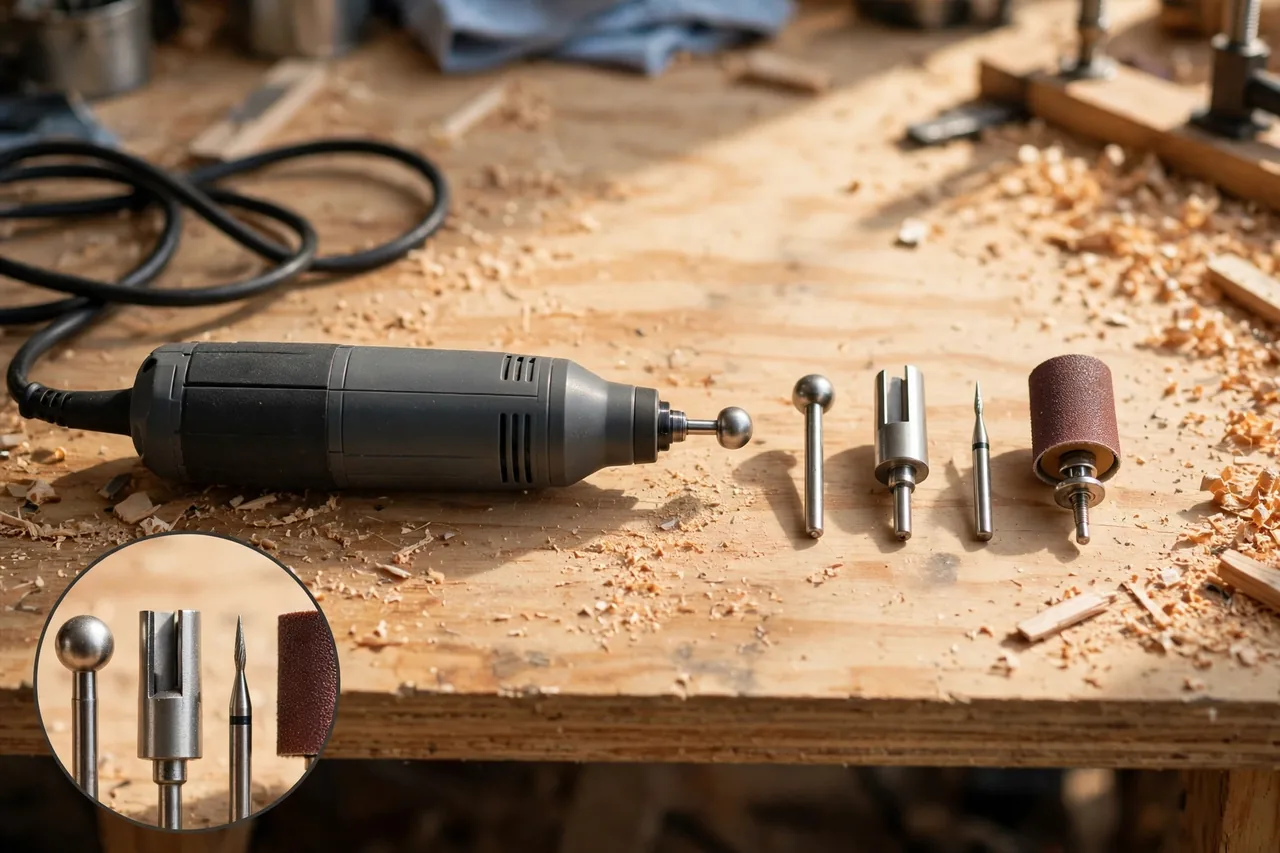
You do not need a drawer full of accessories. Four cover every stage of a pumpkin project, and they are the same ones Dremel’s own pumpkin project guides reach for. Everything else in a big accessory kit can stay in the box.
Dremel pumpkin carving bits at a glance
| Accessory | Shape and size | What it does on a pumpkin |
|---|---|---|
| 191 High-Speed Cutter | Rounded ball nose, 1/8 inch (3.2 mm) | Outlines and medium detail. Its rounded edges make it forgiving, and Dremel’s pumpkin kit guidance calls it ideal for fine details. |
| 194 High-Speed Cutter | Flat cylinder (barrel), 1/8 inch (3.2 mm) | Clears and shades larger areas. The cylinder removes material deeply, cuts flat areas, and makes V-cuts at a 45-degree angle. |
| 106 Engraving Cutter | Small ball head, 1/16 inch (1.6 mm) | The finest lines: whiskers, lettering, fur texture, tiny highlights. Dremel’s own accessory guide lists it for detail engraving. |
| Sanding band on a drum mandrel | 1/2 inch drum (such as the 407 mandrel and band, or an EZ Drum) | Smooths rough areas, levels shading, and knocks down fuzzy edges for an even glow. |
Just as important is what to leave out. Cut-off wheels are made for hard, dry materials; on a wet pumpkin they clog, grab, and can shatter — never use one here. Wire brushes fling debris and shred soft flesh, and drill bits wander on the curve and can crack the wall. Stick to the four accessories above.
What You Need Before You Start
Gather everything first — once the pattern is taped on, you do not want to stop mid-design to hunt for a bit:
- A rotary tool with variable speed (cordless is easiest around a wet pumpkin, since there is no cord to drag through the mess)
- The 191, 194, and 106 accessories, plus a sanding band and drum mandrel
- A pumpkin with a thick wall for shaded designs, or a foam pumpkin labeled “carvable” for the foam method
- A serrated pumpkin saw or sturdy knife for the opening, and a large spoon or scraper for gutting
- A printed stencil, tape, and a push pin, skewer, or toothpick for transferring the pattern
- Safety glasses, and a dust mask if you are carving foam
- A battery LED light or flameless candle for the light test (a real candle is fine only in a real pumpkin, never unattended)
- A damp cloth, an old towel for the mess, and a bowl for seeds and scraps
Choosing the pumpkin matters more than choosing the tool. For surface shading, pick a heavy, firm pumpkin with no soft spots — shading needs wall thickness, and a thin-walled pumpkin punches through at the first deeper shade. Put the smooth side forward and the bumpy side at the back.
For foam, only buy a pumpkin sold as carvable. Hard-shelled decorative ones can chip and fight the bit; a carvable one is hollow and soft-walled, so the tool treats it almost like the real thing — no seeds, no slime, no rotting on the porch.
Speed and Technique: Let the Bit Do the Work
A rotary tool cuts with speed, not force. That one idea controls everything about carving pumpkins with a Dremel: the speed you pick, how hard you press, and how clean your lines come out.
Picking a speed
There is no single magic number, because pumpkin flesh is soft and every tool’s dial reads differently. The light pen-style tool in Dremel’s own pumpkin kits, the Stylo+ 2050, runs from 5,000 to 22,000 RPM — and pumpkin work lives in the lower half of that range. Start low, test on the back of the pumpkin, and raise the speed only until the bit shaves cleanly instead of dragging.
- Outlining: low-to-medium speed. Too fast and the bit skips across the hard skin and jumps off your line.
- Clearing and shading: medium speed, so the 194 shaves in smooth passes instead of tearing.
- Fine detail: low-to-medium speed with the 106, in short touches — fine bits punish a heavy hand.
- Foam pumpkins: lower speed and a lighter touch than real pumpkin; foam melts and fuzzes under a fast, hard bit.
- Sanding: low speed. A fast sanding band gouges soft flesh and digs dips into your shading.
Pressure, grip, and passes
Hold the tool like a fat pencil, brace your hand against the pumpkin or the table, and steer with small movements. Press lightly — a forced bit stops cutting and starts plowing, and one hard push can poke straight through the wall. Let the spinning edge shave the surface instead.
Work in shallow passes. Take off a thin layer, look at it, then go again — you can always carve deeper, but you can never put flesh back. Light passes also keep the bit clear, since wet fibers pack into a cutter’s flutes; when the bit starts smearing instead of cutting, switch off, wait for a full stop, and wipe it clean.
Finally, test before you commit: try each bit, speed, and depth on the back of the pumpkin or the cut-off lid first. Thirty seconds of testing is the cheapest insurance in the whole project.
Step by Step: Carving a Real Pumpkin with a Dremel
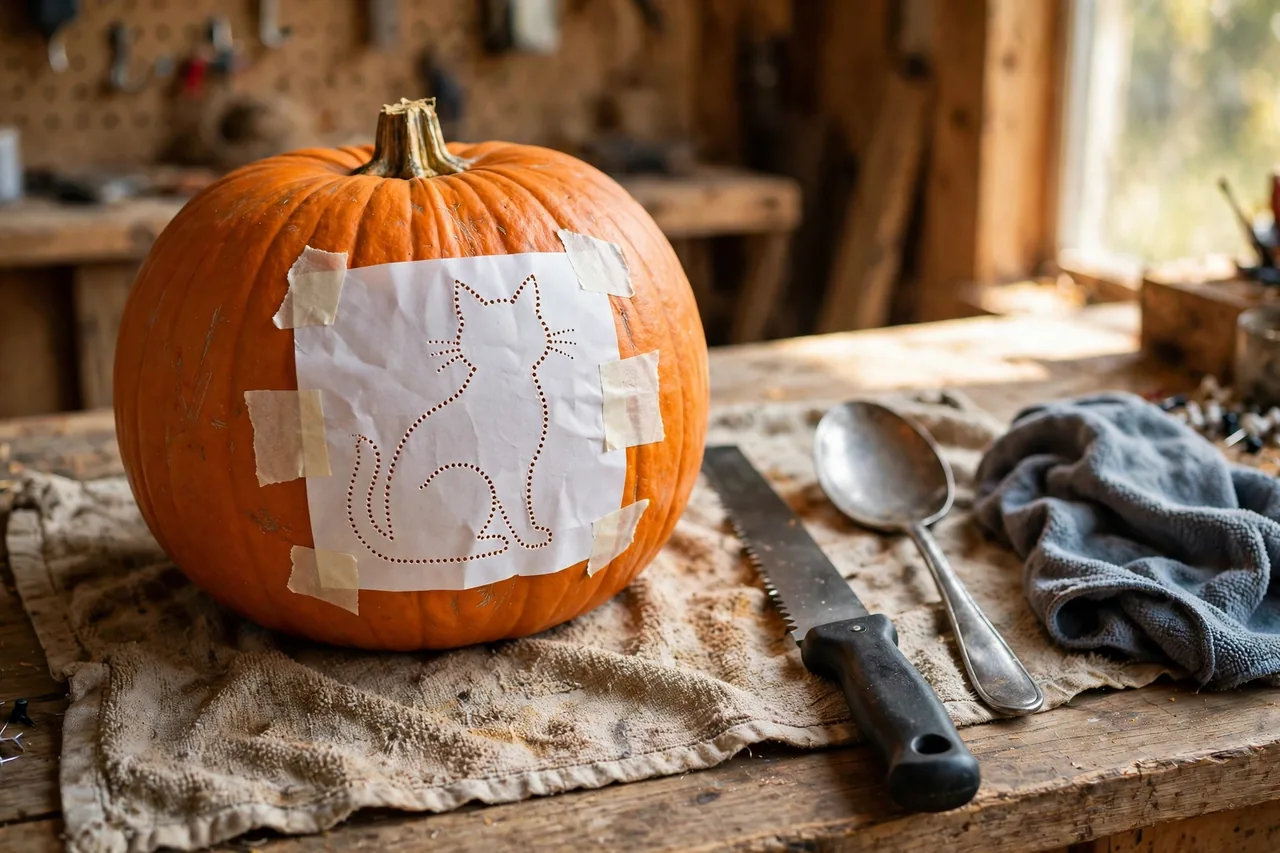
Here is the full process in order — and the order matters, because surface carving always comes after the pumpkin is opened and cleaned, when it is lighter, steadier, and easier to shade evenly.
- Cut the opening. Cut a circle around the bottom of the pumpkin (or the top, around the stem), angling the blade slightly so the piece sits back in place. A bottom opening keeps the top clean and lets you set the pumpkin down over its light.
- Gut it and thin the wall. Scoop out the seeds and strings, then scrape the inside wall behind your design until it is noticeably thinner than the rest. Thinning from inside is what lets shading glow — light passes through the carved layer plus a slim wall, not the full thickness.
- Transfer the pattern. Tape the stencil against the face, slitting the paper edges so it hugs the curve. Following Dremel’s stencil method, pierce small holes along the design lines with a push pin or skewer, then remove the paper — you are left with a dotted outline to carve along.
- Outline with the 191. Fit the 191 high-speed cutter, start at low-to-medium speed, and carve along the dotted lines, removing the skin inside the design areas. Stay inside your lines — a shape can be widened later, never narrowed.
- Clear the big areas with the 194. Switch to the barrel-shaped 194 and shave away the larger zones that should glow, in smooth overlapping strokes, like coloring with a pencil. Dremel’s own project walkthrough sequences the job the same way: outline first, then etch away the larger spaces.
- Add shading and detail. Deepen the areas that should glow brightest, and leave others as a shallow skin-only pass for a dimmer tone — the next section explains the depth rules. Save the 106 for the smallest details, once the big shapes are settled.
- Smooth with the sanding band. Run a sanding band on its drum mandrel at low speed over rough patches and uneven shading. This evens out the glow and removes the torn, fuzzy look raw cutter passes leave behind.
- Clean up and do a light test. Brush off loose fibers, wipe the surface, then put the light inside and darken the room. Thin spots glow hotter than expected and thick spots stay dark — deepen the dark patches a little at a time until the tones balance.
Set the finished pumpkin at eye level on the porch, where it anchors the display and pairs naturally with the builds in our guide to do it yourself Halloween props — it is usually the piece trick-or-treaters stop to study.
Surface Shading: How the Glow-Through Effect Works
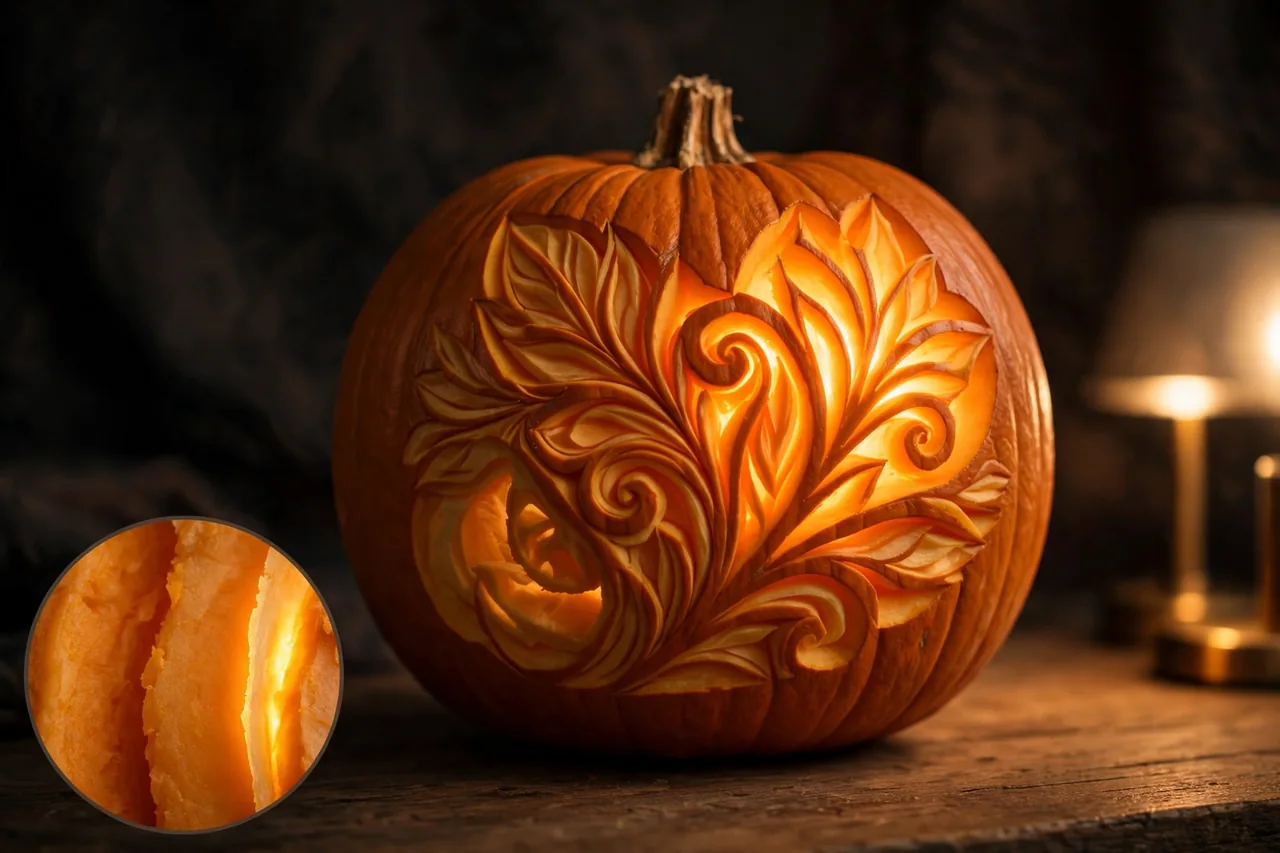
Surface shading works like a dimmer switch for light. Pumpkin skin blocks light almost completely; pale flesh lets some through — and the thinner the flesh you leave, the more light escapes. Carvers call it lithophane-style carving: the picture is stored as thickness, and light reveals it.
Think in three depth levels and assign every part of your design to one of them before you start:
- Skin only removed (darkest tone). Just the orange skin comes off, leaving full flesh beneath; the area glows a dim, deep amber. Use it for background texture, shadows, and anything that should sit “behind” the subject.
- About halfway through the wall (mid tone). The area glows clearly but softly — your main modeling shade for cheeks, folds, fur, or the sides of a haunted house.
- Thin flesh left (brightest tone). Only a slim layer remains before the hollow inside, so it glows almost like a cut-out. Save it for highlights: eyes, windows, a moon, the edge of a ghost.
Two techniques keep shading from looking blotchy. First, keep each pass even — an accidental deep gouge inside a mid-tone area shows up as a bright blob when the light goes on, and it is the hardest flaw to hide. Sweep the 194 in steady, overlapping strokes, and check depth by fingertip (tool off) as much as by eye.
Second, thin from the inside. If you scraped the wall behind the design down during gutting, surface depths stay shallow and controllable, and the contrast between tones gets stronger. Skip that step and you must dig dangerously deep from the front for the same brightness — where breakthroughs happen.
One classic trick is worth stealing: the silhouette. Leave your main figure as untouched skin and shade away everything around it. The figure stays dark while the background glows, so the shape pops like a shadow puppet — far more forgiving than shading a detailed face. A row of these pumpkins is the finishing touch in most DIY scary Halloween decorations.
Carving a Foam Pumpkin with a Dremel

A carvable foam pumpkin skips the messiest half of the job: no gutting, no seeds, no slime, and the finished piece stores away for next Halloween. The technique is nearly the same, with four adjustments that matter.
Speed down, touch lighter. Foam is softer than pumpkin flesh and reacts to friction differently — push too hard or spin too fast and the surface melts, tears, or turns fuzzy instead of cutting clean. Start low, outline first, and deepen in extra-light passes.
Through-cuts are allowed here. A foam pumpkin is hollow with a thin wall, so the 191 and 194 can cut shapes all the way through without the clogging fight of wet flesh. Many foam carvers cut the main shapes through, then use surface shading only for detail — just work slowly near a cut-out’s edge so the thin wall does not crack.
Expect dust, and clean the fuzz. Foam carving makes fine dust instead of juice, so wear a dust mask and carve outside or over a drop cloth. Edges often come out fuzzy; run the sanding band lightly over them, and tidy small areas with a nail file.
Light it with an LED, never a flame. Foam is plastic, and a real candle inside a foam pumpkin is a fire risk, full stop. Use a battery LED or flameless candle — for a piece you keep for years, that is part of the design, not a compromise.
If carving is not the route you want for a foam pumpkin, paint is the other classic treatment — our guide to terracotta pumpkins turns plain foam into a clay-look piece that runs from September through Thanksgiving.
Safety Rules for Rotary Tools and Wet Pumpkins
A rotary tool is small, but its bit spins thousands of times a minute and throws debris — and pumpkin carving mixes in water, electricity, and a round object that wants to roll. These rules keep the project fun.
- Wear eye protection, always. Bits throw skin chips, fibers, and foam dust straight up, and ordinary glasses are no substitute for safety glasses. Dremel’s pumpkin guidance treats adult supervision as mandatory with sharp tools — the adult runs the rotary tool; kids draw, transfer patterns, and gut pumpkins.
- Dry hands, dry tool. Gut the pumpkin first, then towel everything off before the tool comes out. Wet, slimy hands slip, and moisture plus a corded tool is a bad mix; cordless removes the cord from the equation entirely.
- Unplug before you change bits. Dremel’s manuals are blunt about this — always unplug the tool (or remove the battery) before changing accessories, and let the bit stop fully before setting the tool down.
- Brace the pumpkin, free hand clear. Set the pumpkin on a towel so it cannot roll, and keep your free hand well away from the carving face. Never carve toward your holding hand, and never hold a pumpkin in your lap while a bit spins.
- Stop for slips and clogging. If the bit clogs, grabs, or the pumpkin shifts, release the trigger and reset. Most detail-carving accidents happen in the half-second of trying to “save” a cut that is already going wrong.
Mistakes That Ruin a Dremel Pumpkin (and How to Fix Them)
Almost every failed Dremel pumpkin fails in one of five predictable ways. Knowing them in advance is worth more than any stencil.
- Pressing too hard. The bit plows, chatters, or punches through the wall — if the motor sounds strained, you are pushing. Break through anyway? Pin the loose piece back from inside with two toothpicks, then shade shallower around the repair.
- Carving before gutting and thinning. On a full pumpkin, shading barely glows because light still has to fight the whole wall. Open, gut, and thin first — the biggest single difference between dull and dramatic.
- Choosing a design that is too detailed for the pumpkin. Tiny features turn to mush on a small or very round pumpkin. Match detail to size: bold shapes on small pumpkins, fine shading only on large, flattish faces.
- Running foam too hot and fast. Melted, fuzzy edges come from speed and pressure, not a bad bit. Drop the speed, lighten your touch, and finish edges with the sanding band or a nail file.
- Skipping the light test until the end. Depth mistakes are invisible in daylight and glaring in the dark. Test with the light inside after the first shading pass, while fixes are still easy.
Related Guides
- Do It Yourself Halloween Props — tombstones, ghosts, and standalone builds to group around your pumpkin.
- DIY Haunted House Props — room-by-room scares for a home haunted-house setup.
- How to Make a Halloween Wreath — finish the front door your porch pumpkins point toward.
- Terracotta Pumpkins — the no-carve foam pumpkin treatment for indoor and porch styling.
Frequently Asked Questions
Can you use a Dremel tool to carve a pumpkin?
Yes. A Dremel rotary tool carves a pumpkin well, especially for surface work: outlines, shading, and fine detail a knife cannot manage. Open and clean the pumpkin with a saw and spoon first, then use the Dremel on the surface — it is a carver, not a saw, so leave cut-outs to the knife and the artistry to the rotary tool.
What Dremel bit is best for pumpkin carving?
There is no single best bit — there is a best bit per stage. Outline with the 191 high-speed cutter, whose rounded edges suit fine detail. Clear and shade larger areas with the barrel-shaped 194. Finish the tiniest lines with the 1/16 inch 106 engraving cutter, and smooth everything with a sanding band on a drum mandrel.
Can I use a Dremel to carve foam pumpkins?
Yes, and foam is in some ways easier: no gutting, no slime, and the finished pumpkin keeps for years. Choose one labeled carvable, use a lower speed and lighter touch than on a real pumpkin, wear a dust mask, and light it only with a battery LED — never a real candle.
What safety precautions should I take when using a Dremel to carve a pumpkin?
Wear safety glasses, keep hands and tool dry, and unplug or remove the battery before changing bits. Brace the pumpkin so it cannot roll, keep your free hand out of the carving path, and let an adult do all rotary-tool work. Add a dust mask when carving foam.
How should I clean up fuzzy edges after carving?
Run a sanding band on its drum mandrel at low speed along the fuzzy edge, using the lightest pressure that removes the fuzz. For small, tight areas, a nail file does the same job by hand — the fix foam crafters rely on. Brush the dust away afterward so you can see the true edge before carving more.
Your next step is simple: pick one design with bold shapes, one thick-walled pumpkin, and the 191 bit — and carve a test patch on the back before you touch the front. One practice pumpkin teaches you more about speed, pressure, and depth than any guide can.
Disclaimer: Rotary tools spin sharp accessories at high speed and can injure you if they slip or grab. Follow your tool manufacturer’s manual, wear eye protection, and let an adult handle all carving steps; if any part of a project feels beyond your tools or experience, choose the simpler method or get experienced help.