A blinking green light on a Daikin air conditioner is the Operation lamp telling you one of two things: the unit is in a normal protection state, or it has detected a fault and locked itself out. Most cases can be diagnosed at home in a few minutes by reading the stored error code. This guide walks you through what the light means, how to fix it, and when to call a professional.
I’ve spent years standing in front of these units with a remote in one hand and a multimeter in the other, and the green light is almost always the first clue homeowners describe over the phone. The good news is that it’s a far more readable signal than people assume. Let’s go through it the way I’d explain it if I were standing in your living room.
Snippet-Ready Definition
A blinking green light on a Daikin aircon is the Operation lamp signalling either a normal protection state or a detected fault lockout. Reading the stored error code with the remote tells you the exact cause and whether you can fix it yourself.
Our Mission
Dwellify Home exists to help homeowners and property enthusiasts make practical, informed decisions about their living spaces. With guidance like this Daikin aircon troubleshooting walkthrough, we aim to turn confusing warning signals into clear, confident next steps you can act on at home.
What the green light on a Daikin air conditioner actually is
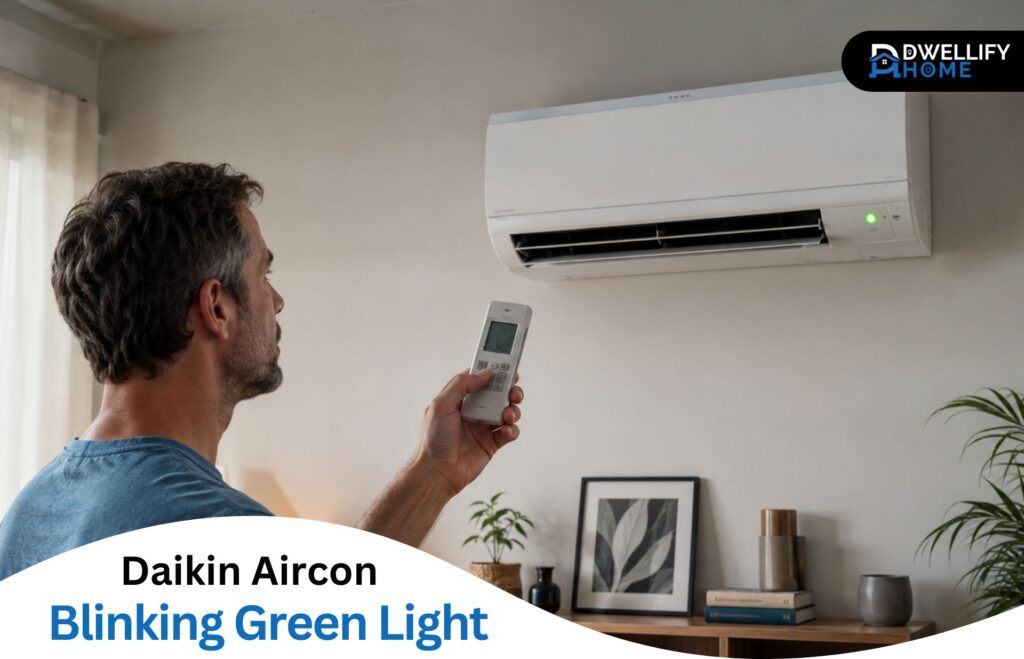
The top green light on your indoor unit is Daikin’s Operation lamp. When it glows steady, the unit is running normally. When it blinks, it’s flagging something worth a look. That’s the whole job of that light.
On most residential wall-mounted Daikin splits, you’ll see a small row of LEDs on the indoor unit. The green one on top is the Operation lamp. Below it sits an orange Timer lamp, and depending on the model, a third light for the motion sensor or Wi-Fi.
Here’s the detail that trips a lot of people up: most home Daikin wall units don’t have a separate red “fault” light. People go looking for an angry red warning that isn’t there. The green Operation lamp does double duty. It signals normal running and, by blinking, it signals a fault too. So a blinking green light isn’t a different light coming on; it’s the same one changing its behavior.
Key things this guide helps you do:
- Tell the difference between a harmless protection blink and a genuine fault lockout
- Retrieve the exact error code using your Daikin remote
- Run Daikin’s official reset correctly (the full 20-minute method)
- Decode common codes like U4 and E7 and judge how serious they are
- Know which fixes are safe to do yourself and which need a licensed technician
When a flashing green light is normal — and when it’s a fault
A flashing green light falls into two buckets. Sometimes it’s the unit protecting itself during a normal cycle, and there’s nothing to fix. Other times it’s a genuine fault that has stopped the system. The quickest way to tell them apart is simple: if the aircon is still cooling or heating fine, you’re likely looking at normal behavior. If the Daikin AC’s green light is blinking and the AC’s not working, treat it as a fault.
Normal, harmless blinking shows up in a few situations. After the unit shuts off, the compressor won’t restart for about three minutes, and the light may flash during that wait. In heating mode, the outdoor unit runs a defrost cycle every so often, which can blink the light for three to ten minutes while it clears ice. On multi-split systems, if one indoor unit is set to cool while another is set to heat, the standby unit will flash because it can’t run an opposing mode. Daikin treats that mode-mismatch as expected, not a malfunction. And on Streamer models, a flashing light paired with an “AH” code usually just means the air-purifying unit was removed or needs cleaning.
Fault blinking is different. The unit either refuses to start or stops part way through a cycle, and the green light keeps flashing without recovering. That’s a malfunction lockout, and it means the control board has registered an error and parked the system for safety. When that’s what you’re seeing, the next step is to find out exactly what the unit is complaining about.
How to read the Daikin error code with your remote
You can pull the exact error code straight from your wireless remote in under a minute. Point the remote at the indoor unit, press and hold the TIMER CANCEL button for about five seconds, and the temperature display will switch to “00.” From there, press CANCEL repeatedly to scroll through possible codes while you listen to the beeps. The unit tells you which code is stored through the sound it makes.
The beeps are the part most guides skip, and they’re the whole trick:
- A short beep means that code is not a match. Keep going.
- Two short beeps mean you’re close — the first digit (the tens) matches.
- One long continuous beep is your stored error code. Stop there and write it down.
So you’re essentially walking through the list until the unit gives you that long confirmation tone. The code showing on the display at that moment is the fault.
A quick note on remotes: the procedure is the same across most ARC-series wireless remotes, though the button is sometimes labelled just CANCEL rather than TIMER CANCEL. Some newer remotes display the code directly without the beep-scrolling step. Universal or aftermarket replacement remotes generally can’t enter this diagnostic mode at all, which catches people out when they’ve replaced a lost original.
What to do if your remote won’t enter diagnostic mode
If holding CANCEL does nothing, start with the obvious: weak remote batteries are the most common reason the diagnostic mode won’t trigger, so swap them and try again. If you’re using a generic replacement remote, it simply won’t have the function. And if your system runs off a wired wall controller rather than a handheld remote, which is typical on ducted, SkyAir, and VRV systems, the code-checking method is different and usually involves a menu on the controller itself. When you can’t retrieve a code by any of these routes, skip ahead to the reset, and if the light persists, that’s your cue to bring in a technician.
Common error codes behind a blinking green light
Once you have a code, you can judge how serious it is. The list below covers the codes I see most often behind a flashing green light, with a plain-English meaning and whether it’s something you can tackle yourself. One honest caveat: code definitions vary slightly between models, so your unit’s manual is always the final authority.
| Code | What it usually means | DIY or technician |
| 00 | No fault stored (see the dedicated section below) | DIY |
| U4 | Indoor–outdoor communication failure | Technician |
| E7 | Outdoor fan motor fault | Mostly technician |
| A3 | Drain or float switch (water level) | DIY check first |
| A6 | Indoor fan motor | Technician |
| A1 | Indoor unit circuit board | Technician |
| A5 | Freeze-up or high-pressure protection | Technician |
| L5 / E5 / E6 | Compressor or inverter fault | Technician |
| U0 / F3 | Refrigerant shortage or high discharge temperature | Technician |
| U2 | Power supply voltage problem | Technician |
| C4 / C9 / J3 / J6 | Temperature sensor (thermistor) faults | Technician |
The two codes that come up far more than the rest are U4 and E7, so they’re worth a closer look.
U4: indoor-to-outdoor communication failure
U4 means the indoor and outdoor units have stopped talking to each other. The control boards exchange signals over a thin communication wire, and when that conversation drops, the system locks out. The Daikin air conditioner flashing green light with a U4 is one of the most frequent combinations I’m called out for.
Common causes are a loose or corroded terminal connection, a damaged communication wire, or a control board knocked out by a power surge. In areas that get heavy storms, lightning-related board damage behind a U4 is more common than people expect. What you can safely do yourself is run the reset described below and confirm the outdoor unit actually has power. Anything involving opening terminal covers, testing wiring, or replacing a board is technician territory.
E7: outdoor fan motor fault
E7 points to the outdoor fan motor. The fan either can’t spin freely or the motor is overheating, so the unit tries a few times, fails, and locks out with the green light flashing. I’ve cleared plenty of E7 codes that turned out to be nothing more than leaves, a stick, or a plastic bag jammed against the fan blade.
Switch the system off and take a look at the outdoor unit. If something is obviously blocking the fan, clearing it and resetting may resolve it. If the fan is clear but the code returns, the motor or its capacitor is likely failing, and that’s a job for a technician.
The official Daikin reset procedure
To reset a Daikin properly, turn the unit off, switch off the dedicated circuit breaker that feeds the air conditioner, wait a full 20 minutes, then switch the breaker back on. This is Daikin’s specified method, and the 20-minute wait matters more than most people realise. It’s not the 30 seconds you’ll see repeated all over the internet.
The reason for the wait is that the control board holds a small residual charge and keeps internal protection timers running. A quick flick of the breaker often isn’t long enough for the board to fully power down and clear a soft fault. Giving it the full 20 minutes lets the stored charge drain and the timers reset, which is why a proper reset clears glitchy codes that a rushed one leaves behind. I’ll be straight with you: a shorter reset does sometimes work, and you’re welcome to try it first. But 20 minutes is the manufacturer’s number, and it’s the one I use when I want to be sure.
A couple of practical points. Use the dedicated breaker for the aircon, not the main switch for the whole house. And after you power it back on, don’t panic if the unit takes five to ten minutes to start cooling. That start-up delay is normal, especially while the compressor protection timer counts down. This is also the cleanest way to do an error code reset on a Daikin without any special tools.
Blinking green light but no error code (code 00)
A Daikin showing a blinking green light but no error code, or returning “00” when you run the diagnostic, is telling you that no fault is currently stored. That’s reassuring, but it doesn’t always mean nothing happened. It usually means the issue was transient, the unit is in a normal protection state, or your model doesn’t store codes at all.
Think about what the blink could be at that moment. If it’s within a few minutes of the unit cycling off, it’s probably the compressor restart delay. In heating, it could be a defrost cycle. On a multi-split, it could be a standby unit caught in a mode mismatch. All of those produce a blink with no fault behind it.
There’s also the matter of older non-inverter units. Many of them don’t store error codes the way inverter models do, so the blink pattern itself is the only signal you’ll get. The practical move in every one of these cases is the same: run the 20-minute reset. If the light comes back with no code after a clean reset, that points toward an intermittent communication fault, a board issue, or a sensor that’s drifting but hasn’t hard-failed yet, and that’s worth having looked at before it becomes a firm fault.
Why your Daikin won’t turn on while the green light flashes
A Daikin air conditioner that’s not turning on with the green light flashing is usually doing one of four things: waiting out the three-minute compressor protection delay, sitting in a full fault lockout, struggling with a weak or tripped power supply, or failing to receive a signal from the remote. Sorting out which one you’re dealing with is mostly about timing and patience.
The harmless case is the protection delay. If you’ve just switched the unit on, or it recently cycled off, give it a few minutes. A delay clears itself and the unit starts. A genuine lockout doesn’t; the light keeps flashing no matter how long you wait, and the system never kicks in.
Before assuming the worst, rule out the simple causes. Check that the breaker hasn’t tripped and that the remote has fresh batteries, since a dead remote can look exactly like a dead aircon. If power is fine, the remote works, and the unit still won’t start after a full reset, you’re looking at a stored fault that needs the code pulled and, in most cases, a technician.
Multi-split systems: why all heads (or just one) blink green
On a multi-split system, where several indoor units share one outdoor unit, the pattern of which heads are flashing tells you a lot. As a rule of thumb, if every indoor unit is blinking the same code, the problem is almost always in the outdoor unit, the shared control board, or the communication line they all rely on. If only one head is flashing while the others run fine, the fault is local to that unit, usually its own board, a sensor, or its wiring.
This is also where the mode-mismatch standby behavior shows up most. Multi-splits can’t run heating on one head and cooling on another at the same time, so a unit set to the odd mode out will sit in standby and flash. Before chasing a fault, check that all the heads are set to compatible modes. I’ve been called out more than once for an aircon that simply had two rooms fighting over heating and cooling.
DIY checks vs when to call a licensed technician
Plenty of green-light situations are safe to handle yourself, and plenty are not. Knowing the line keeps you from either paying for a call-out you didn’t need or attempting something that’s genuinely unsafe.
Safe to do yourself:
- Clean or rinse the air filters and clear any obstruction at the indoor and outdoor units.
- Replace the remote batteries.
- Run the official 20-minute reset.
- Retrieve the error code with the remote.
- On a multi-split, check that all indoor units are set to compatible modes.
Leave these to a technician:
- Any work involving refrigerant, which is legally restricted to licensed professionals in most countries.
- Replacing a control board, sensor, fan motor, or compressor.
- Any electrical fault, including wiring and communication-line problems behind a U4.
- Any code that keeps coming back after a proper reset.
One more thing, and I mean this firmly. Switch the unit off at the wall and call straight away if you smell burning, see smoke, hear grinding or knocking from either unit, notice the breaker tripping repeatedly, or see water sitting on or near anything electrical. None of those are reset-and-see situations. They’re stop-now situations.
How to prevent the green light from flashing again
Most repeat green-light faults trace back to a handful of neglected basics, and staying ahead of them is far easier than reacting after a lockout. Clean the filters regularly, ideally every few weeks in heavy-use seasons, because restricted airflow is behind more faults than any single component failure I see.
Keep the outdoor unit clear of leaves, debris, and anything growing too close to it, so the fan and coil can breathe. If you live somewhere with frequent storms or an unstable mains supply, a surge protector is a sensible investment, since power surges are a real cause of the board faults behind communication errors. And a professional service once a year catches the small problems, like a weakening capacitor or a slightly clogged drain, well before they escalate into a flashing light and a dead aircon on the hottest day of the year.
Frequently asked questions
Can I still use my Daikin aircon while the green light is flashing?
If the unit is still cooling or heating normally, the flash is likely a harmless protection state and you can keep using it. If it has stopped working, don’t force it. A fault lockout exists to protect the system, and repeatedly switching it on can make an underlying problem worse. Pull the code first.
What does error code 00 mean on a Daikin?
Code 00 means no error is currently stored in the unit’s memory. It’s the default the display shows before you scroll to a real code. If 00 is all you get, the fault was either transient, a normal protection cycle, or your model doesn’t log codes. Run a reset and watch whether the flashing returns.
Does the reset procedure work for ducted Daikin units too?
Yes. The dedicated-breaker reset works the same way on ducted systems: switch off the breaker that feeds the unit, wait the full 20 minutes, and restore power. The difference with ducted systems is the controller. They use a wired wall controller rather than a handheld remote, so the error-code check is done through that controller’s menu.
Why is the green light flashing right after a service or repair?
A flash straight after a service is often nothing more than the unit running its start-up and compressor protection sequence as it powers back up. Give it ten minutes. If it settles and runs, you’re fine. If the flashing persists or a code appears, contact whoever did the work, since something may not have been reconnected fully.
How do I check the error code on a non-inverter Daikin that has no display?
Many older non-inverter units don’t store retrievable codes, so the remote diagnostic won’t return anything useful. On these, the blink pattern itself is the diagnostic signal a technician reads, often alongside checking the indoor board’s own indicator lights. If yours has no display and no code, a reset is your best first step before calling for help.
How do I reset my blinking light on Daikin?
Turn the unit off, switch off the dedicated circuit breaker that feeds the aircon, and wait a full 20 minutes before switching it back on. This lets the control board fully power down and clear soft faults. Expect a five to ten minute start-up delay afterward, which is normal.
Why is my AC blinking green light?
The green Operation lamp blinks for one of two reasons: a normal protection state, such as the three-minute compressor restart delay or a defrost cycle, or a detected fault that has locked the system out. If the unit still cools or heats normally, it’s usually harmless. If it has stopped, treat it as a fault.
Why is my Daikin AC light blinking and not cooling?
A blinking light with no cooling points to a fault lockout, where the control board has registered an error and parked the system. Retrieve the error code with your remote, then run the 20-minute reset. If it returns or the unit still won’t cool, the code likely needs a technician.
How do I turn off the green light on my Daikin air conditioner?
A steady green light is normal and simply shows the unit is running, so it isn’t meant to be switched off. A blinking green light clears once the underlying cause is resolved, either when a normal protection cycle finishes or after you fix the fault and reset the unit.
Conclusion: making sense of your Daikin’s blinking green light
A Daikin aircon blinking green light is a diagnostic signal, not an emergency in the vast majority of cases. The light is simply doing its job, telling you the system is either protecting itself or has parked a fault for you to read.
Work it in order: figure out whether the flash is normal behavior or a genuine lockout, pull the error code with your remote, and run the official 20-minute reset. That sequence resolves a large share of what people call me about. For the codes and symptoms that point to refrigerant, electrical, or board faults, bring in a licensed technician rather than pushing the unit to keep running. Read the signal calmly, and a flashing green light becomes one of the most useful things your aircon can tell you.
Disclaimer: This content is for general informational purposes only. Individual units, models, and situations vary, and your air conditioner’s manual remains the final authority. When in doubt, or for any electrical or refrigerant work, consult a licensed technician.