Mitsubishi remotes are usually simple once you know the basic icons, but they don’t always feel simple when you’re standing there pressing MODE and watching the little symbols change on the screen.
Most Mitsubishi air conditioning symbols explained in plain English come down to five main operating modes: cooling, heating, dry, fan, and auto. After that, the other icons usually control fan speed, airflow direction, timers, sleep settings, economy features, or model-specific extras.
Snippet-Ready Definition
Mitsubishi air conditioning symbols explained means decoding the icons on a Mitsubishi AC remote so users can choose the right mode, adjust comfort settings, and avoid confusion.
Mission Statement:
Dwellify Home helps homeowners, renters, and property enthusiasts make practical, informed home decisions by explaining everyday systems like Mitsubishi AC remotes in clear, useful language.
Why these remote symbols matter
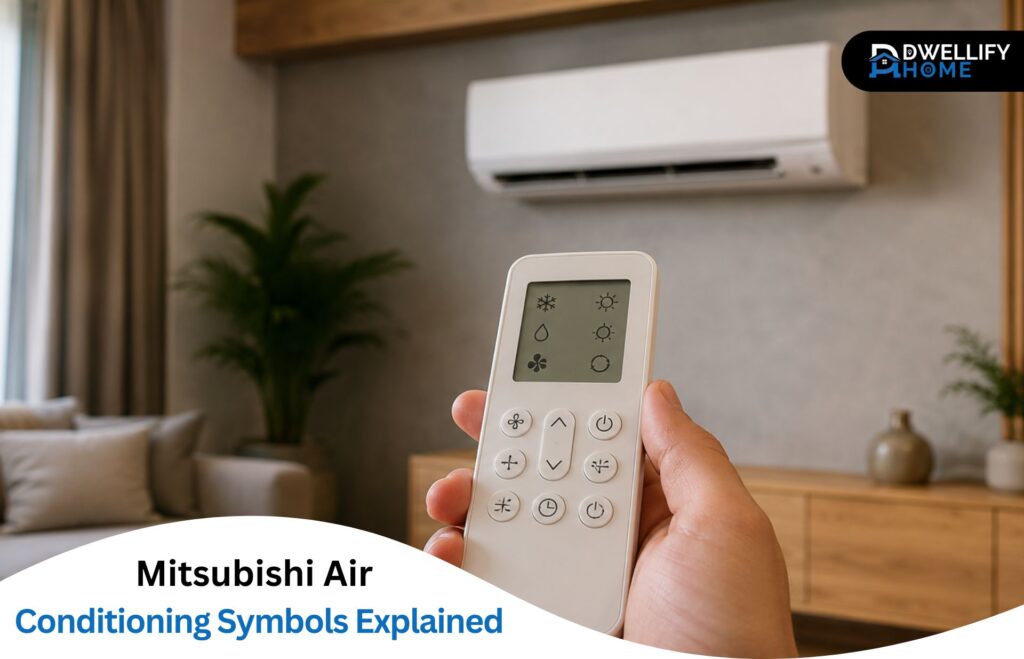
The symbol you choose changes how the unit behaves. A snowflake cools the room. A sun warms it. A water droplet helps with humidity. A fan icon moves air without actively heating or cooling.
That sounds basic, but it matters in everyday use. Dry mode on a muggy day can feel better than overcooling the room. Heat mode in winter gives more predictable warmth than guessing with Auto. The right airflow symbol can stop cold air blowing straight at your face on the sofa.
Check your remote model before assuming every symbol is the same
Mitsubishi Electric and Mitsubishi Heavy Industries remotes share many familiar icons, but they are not all identical. Even within Mitsubishi Electric, different model ranges can have different buttons, labels, and extra features.
That’s why one online chart may not match your exact remote. Use general guides for the basics, but check your indoor unit model, remote model number, or Mitsubishi Electric air conditioner remote control manual for anything unusual.
Quick answer: the main Mitsubishi AC symbols at a glance
Here’s the simple version most people need first:
| Symbol | Usual meaning | Best used for |
| Snowflake | Cool mode | Lowering room temperature |
| Sun | Heat mode | Warming the room |
| Water droplet | Dry mode | Reducing humidity |
| Fan | Fan-only mode | Air circulation |
| Auto or circular arrows | Auto mode | Letting the unit choose operation |
| Fan bars/blades | Fan speed | Adjusting airflow strength |
| Vane/Swing arrows | Air direction | Moving louvers up, down, or sideways |
| Clock/Timer | Timer settings | Scheduled start or stop |
| Moon/Sleep | Sleep mode | Night comfort |
| Leaf/Econo | Economy/Econo Cool | Comfort with reduced energy use on supported models |
Key Benefits / Uses:
- Identify Cool, Heat, Dry, Fan, and Auto mode quickly.
- Understand fan speed, vane, swing, timer, and sleep icons.
- Choose the right setting for cooling, heating, humidity, or air circulation.
- Know when to check the model-specific remote manual.
- Avoid mistaking normal operation or timer settings for a fault.
Snowflake symbol: Cooling mode
The snowflake is the Mitsubishi AC remote control cooling mode symbol on most remotes. Choose it when the room is warm and you want the system to cool the air.
Once cooling is selected, set the temperature, then adjust fan speed and vane direction for comfort. Cooling works best when doors and windows are closed.
Sun symbol: Heat mode
The sun is usually the Mitsubishi AC heat mode symbol. It tells the system to heat the room, assuming your unit supports heating.
Mitsubishi air conditioner heat mode is common on heat pump systems. It may take a short time before warm air starts, especially in colder weather, so don’t judge it by the first few seconds.
Water droplet symbol: Dry mode
The water droplet means Dry mode. It’s for removing moisture from the air, not for strong cooling.
Use it when the room feels sticky, damp, or clammy but not especially hot. It can make a room feel more comfortable without dropping the temperature as aggressively as Cool mode.
Fan symbol: Fan-only mode
The fan symbol means the indoor fan runs without active heating or cooling. It moves air around the room, but it won’t properly lower or raise the temperature.
Fan mode is useful in mild weather or when one part of the room feels still after heating or cooling.
Auto symbol: Automatic mode
Auto mode lets the system decide how to operate based on the set temperature and room conditions. It may heat, cool, or adjust airflow automatically.
It’s convenient, but not always the clearest choice. When you know you want heating, choose Heat. When you know you want cooling, choose Cool.
What do the mode symbols on a Mitsubishi AC remote mean?
What does Cooling mode do?
Cooling mode removes heat from the room and lowers the air temperature. On most Mitsubishi remotes, it’s shown by a snowflake. Use it when the room is genuinely warm, then set a sensible temperature and adjust fan speed so the unit can cool steadily without blasting air unnecessarily.
Cooling mode is different from Fan mode because the outdoor unit and refrigeration cycle are involved. It’s also different from Dry mode because the main aim is temperature reduction, not humidity control.
For normal home use, start with Cool mode, choose a comfortable set temperature, and avoid constantly pushing the setting very low. That often makes the unit run harder without making the room comfortable any faster.
What does Heat mode do?
Heat mode warms the room and is usually shown by a sun symbol. On a heat pump system, the unit transfers heat indoors rather than using the indoor fan alone. Warm air may not come out instantly because the system often waits until the indoor coil is warm enough.
This delay is normal on many systems. It stops the unit from blowing cold air at the start of heating.
Use Heat mode when you want steady winter warmth. Set the temperature where you want the room to settle, then give the system time to work. Constantly switching between modes usually makes comfort worse, not better.
What does Dry mode do?
Dry mode reduces humidity and is commonly shown by a water droplet. It is best for damp, sticky conditions where the room feels uncomfortable even though the temperature is not very high. It may cool slightly, but cooling is not its main job.
Dry mode is useful on rainy days, humid evenings, or in rooms that feel clammy. It’s not the best choice for a hot room that needs a strong temperature drop. In that case, use Cool mode instead.
A good way to think about it: Cool mode tackles heat; Dry mode tackles moisture.
What does Fan mode do?
Fan mode circulates indoor air without actively cooling or heating it. It’s usually shown by a fan icon. Use it when the room temperature is already acceptable but the air feels still, uneven, or trapped in one area.
Fan mode can help after cooling or heating because it spreads air through the room. It can also be useful in mild weather when you don’t need the compressor running.
Just don’t expect Fan mode to cool a hot room. It may feel fresher because the air is moving, but it is not the same as air conditioning.
What does Auto mode do?
Auto mode lets the Mitsubishi system choose operation based on the set temperature and room conditions. The icon may appear as Auto, an “A,” or circular arrows. It is handy when you want the unit to manage comfort without changing modes yourself.
Auto can feel unpredictable in some homes. A room with strong afternoon sun, open doors, or uneven insulation may cause the system to change behavior in ways that don’t match what you expected.
Use Auto for general convenience. Use Heat or Cool when you want direct control.
Why does your Mitsubishi remote look different from online symbol guides?
Mitsubishi Electric vs Mitsubishi Heavy Industries remotes
Mitsubishi Electric and Mitsubishi Heavy Industries are different product families, and their remotes are not guaranteed to match. The main symbols may look familiar, but button names, menu paths, and advanced features can differ.
That’s why one guide may show Econo Cool while another shows High Power, 3D Auto, Night Setback, or a different timer layout. The safest approach is to use symbol guides for common icons and the correct manual for exact features.
Why symbols vary by model, series, and region
Remote layouts can vary by model range, region, and indoor unit type. Some Mitsubishi remotes are simple and only show the core modes. Others include advanced airflow, weekly timers, 3D i-See sensors, purifier settings, or self-clean functions.
A remote for an MSZ model, a heat pump system, or an MHI unit may not display the same icons as another Mitsubishi remote. That does not mean your remote is wrong. It usually means the guide you’re viewing is for a different model.
How to find the correct Mitsubishi Electric air conditioner remote control manual
Look for the model number on the indoor unit first. It is often on a label under the front panel, on the side, or near the filter area. The remote may also have its own model number printed inside the battery cover or on the back.
Search using the indoor unit model plus “remote control manual.” A Mitsubishi Electric air conditioner remote control manual is the best source for exact symbols, especially for timers, special modes, and warning indicators.
What do the fan, vane, and airflow symbols do?
Fan speed symbols, auto fan, and quiet mode
Fan speed symbols usually appear as bars, blades, or stepped levels. Low speed is quieter and gentler. High speed moves more air and helps cool or heat a room more quickly. Auto Fan lets the unit choose the speed based on demand.
Quiet mode or Silent mode reduces operating noise on supported models. It’s useful in bedrooms, nurseries, or home offices, but it may slow how quickly the room reaches temperature.
For fast comfort, use a stronger fan speed first. For steady comfort, turn it down once the room feels right.
Vertical vane, horizontal vane, and swing symbols
Vane and swing symbols control where the air goes. Vertical vane adjustment moves airflow up and down. Horizontal vane adjustment moves airflow left and right, if your model supports it.
For cooling, air often feels better when it’s directed across the room rather than straight down at people. For heating, directing warm air lower can help because warm air naturally rises.
Swing mode keeps the louvers moving, which helps spread air more evenly. Fixed vane position is better when you want to avoid a draft over a bed, desk, or sofa.
3D Auto, 3D i-See, direct airflow, and indirect airflow
Some Mitsubishi remotes include advanced airflow features such as 3D Auto, 3D i-See, direct airflow, or indirect airflow. These are model-dependent settings, often linked to sensors or automated louver movement.
The idea is simple: the system tries to manage airflow more intelligently. Direct airflow may aim comfort toward occupied areas. Indirect airflow may help avoid air blowing straight onto people.
These features are useful, but don’t worry if your remote doesn’t have them. The core comfort settings are still mode, temperature, fan speed, and vane direction.
What do the timer, sleep, economy, and extra feature symbols mean?
On timer, off timer, and weekly timer symbols
Timer symbols usually use a clock icon or ON/OFF timer labels. An On Timer starts the unit at a set time. An Off Timer stops it at a set time. Some remotes also support weekly schedules.
Timers are helpful for bedrooms, morning routines, or reducing unnecessary run time. Just remember that timer settings can confuse people later. A unit that turns off “by itself” may simply have an Off Timer set.
Sleep mode and night comfort settings
Mitsubishi sleep mode is usually designed for quieter, more comfortable night operation. Depending on the model, it may adjust the set temperature or operation gradually during the night.
Use Sleep mode when you want comfort without the unit running aggressively. It’s especially helpful when a room feels fine at bedtime but tends to become too cool or too warm later.
Check your manual for exact behavior because sleep settings vary by model.
Econo Cool, economy mode, and powerful mode
Mitsubishi Econo Cool and economy settings are designed to balance comfort and energy-aware operation on supported models. They may adjust airflow or temperature control to maintain comfort with less aggressive running.
Powerful mode or High Power does the opposite. It gives the system a short-term boost to heat or cool faster, where supported.
Use Powerful mode to recover comfort quickly, then return to normal operation. Use economy-style modes when the room is already comfortable and you want steadier running.
Clean, self-clean, purifier, and filter reminder symbols
Clean, self-clean, purifier, allergen, and filter reminder symbols appear on some Mitsubishi remotes. They may relate to drying internal parts, air-cleaning features, filter maintenance, or model-specific cleaning cycles.
These icons do not mean you can ignore the filters. Indoor unit filters still need regular checking and cleaning according to the manual.
A filter reminder is a prompt, not a full diagnosis. After cleaning, some models need the reminder reset through the remote.
Child lock, clock, and display icons
Child lock prevents accidental button presses. It’s useful in homes where the remote gets handled often or settings keep changing without anyone admitting it.
Clock icons relate to time setting and timer functions. Display icons may show current mode, set temperature, fan speed, airflow, or active timer settings.
When timers behave strangely, check the clock first. A wrong time setting can make scheduled operation look like a fault.
Which Mitsubishi AC setting should you use in real life?
Best setting for fast cooling
For fast cooling, choose the snowflake Cooling mode, set a comfortable target temperature, and use a medium-to-high fan speed at first. Aim the vane so air travels across the room rather than directly at one person.
Powerful mode can help on models that support it, but it should not be your everyday setting. Once the room is comfortable, lower the fan speed or switch to Auto Fan.
Best setting for steady winter heating
For steady winter heating, use the sun Heat mode rather than relying on Auto. Heat mode tells the system clearly that you want warmth, which usually gives more predictable comfort.
Warm air may pause briefly during normal heat pump operation, especially in colder conditions. Give the system time before changing settings. Repeatedly pressing buttons often creates more confusion than comfort.
Dry mode vs Cool mode when the room feels humid
Use Dry mode when the room feels damp or sticky but not especially hot. Use Cool mode when the room is actually too warm and needs the temperature lowered.
A common mistake is using Cool mode too aggressively for humidity. The room may become cold but still not feel comfortable. Dry mode can be the better choice in mild, humid weather.
Mitsubishi air conditioner Heat mode vs Auto mode
Mitsubishi air conditioner Heat mode vs Auto mode comes down to control. Heat mode is best when you want the room warmed. Auto mode is best when you want the system to decide whether heating, cooling, or fan operation is needed.
In winter, Heat mode is usually the clearer choice. Auto can be useful in changeable weather, but it may not always match how you want the room to feel.
When Fan mode is enough
Fan mode is enough when the room temperature is already comfortable and you only need air movement. It can help with stuffiness, uneven air, or mild weather.
It won’t remove much heat, add heat, or reduce humidity like the other modes. Think of it as circulation, not conditioning.
Can you control Mitsubishi AC symbols and settings without the handheld remote?
What the Mitsubishi AC remote control app can do
A Mitsubishi AC remote control app may let you change mode, temperature, fan speed, timers, or schedules on compatible systems with the correct Wi-Fi control setup. App features depend on the model, region, and installed accessories.
The app can be useful when the handheld remote is misplaced or when you want scheduling from your phone. Still, it should match your actual unit. Compatibility matters more than the brand name alone.
What to do if the original remote is missing or not working
Start with the simple checks: replace the batteries, clean the battery contacts if needed, and make sure the remote is aimed at the indoor unit. Check whether child lock or timer settings are active.
Before buying a replacement, confirm the indoor unit model and remote model number. Some universal remotes work for basic functions, but they may not support special modes, timers, or advanced airflow settings properly.
Common problems with Mitsubishi AC symbols and remote settings
What if the symbols on your remote do not match online charts?
Online charts are often general. Your remote may belong to a different Mitsubishi range, region, or product family. Use the chart for basic symbols, then confirm unusual icons against your model-specific manual.
Pay special attention to advanced features, timer settings, cleaning icons, and sensor modes. Those are where most mismatches happen.
Why does heating stop or blow cooler air for a few minutes?
Heating can pause briefly during normal heat pump operation. In colder weather, the outdoor unit may also need to manage frost, and airflow may change during that process. A short pause does not automatically mean the unit is broken.
Call for help when heating remains poor, warning lights continue, or the system repeatedly shuts down despite correct settings.
What does a blinking light mean?
A blinking light can mean different things depending on the model. It may be a normal operation indicator, a timer signal, a filter reminder, or a fault warning.
Don’t rely on a generic blinking-light chart unless it matches your unit. Check the manual for your model. Persistent blinking with poor heating or cooling should be treated as a service issue.
Why will the remote not change modes?
A Mitsubishi remote may fail to change modes because of low batteries, child lock, timer settings, incorrect button sequence, poor signal direction, or model limitations. Some systems also restrict certain modes depending on installation or controller setup.
Replace the batteries first. Then cancel timers, check lock symbols, and aim the remote directly at the indoor unit. Small things solve a surprising number of remote complaints.
When should you call a technician?
Call a technician when the unit will not heat or cool despite the correct mode, when blinking lights continue, when the indoor unit shuts down repeatedly, or when strange noises appear during operation.
You should also get help when the manual shows a fault condition or the remote displays symbols you cannot clear. Remote confusion is one thing. Repeated operation faults are different.
Frequently asked questions about Mitsubishi air conditioning symbols
What is the Mitsubishi AC heat mode symbol?
The Mitsubishi AC heat mode symbol is usually a sun icon. It tells the unit to warm the room. The exact appearance can vary by remote model, but the sun is the common heating symbol on Mitsubishi air conditioning and heat pump remotes.
What is the Mitsubishi AC remote control cooling mode symbol?
The Mitsubishi AC remote control cooling mode symbol is usually a snowflake. It means the system is set to cool the room by lowering the indoor temperature. Choose this mode when the room is warm, then set the temperature and fan speed for comfort.
What symbol should I use for humidity?
Use the water droplet symbol, usually called Dry mode, when the room feels humid, damp, or sticky. Dry mode focuses on reducing moisture in the air rather than strongly cooling the room, so it is best for mild but humid conditions.
Is Auto mode better than Heat or Cool mode?
Auto mode is convenient, but it is not always better. Use Auto when you want the system to decide what the room needs. Use Heat when you specifically want warmth, and use Cool when you specifically want cooling.
Are Mitsubishi Electric and Mitsubishi Heavy Industries symbols the same?
Some basic symbols are similar, such as snowflake for cooling and sun for heating, but Mitsubishi Electric and Mitsubishi Heavy Industries remotes are not always the same. Layouts, feature names, timers, and advanced icons can differ.
Can I use my phone instead of a Mitsubishi AC remote?
Some Mitsubishi systems can be controlled by phone when they are compatible with the correct Wi-Fi control equipment and app setup. Not every unit supports app control, so check your model information before assuming your phone can replace the handheld remote.
What do the symbols on my air conditioner mean?
Air conditioner symbols show the mode or setting currently selected. Common icons include a snowflake for cooling, a sun for heating, a water droplet for dry mode, a fan for circulation, and arrows or vanes for airflow direction. Exact symbols can vary by model.
Which mode is cool in Mitsubishi?
Cooling mode on most Mitsubishi remotes is shown by a snowflake symbol. Select it when you want the system to lower the room temperature. After choosing Cool mode, set the temperature, fan speed, and vane direction for steady comfort.
Which mode is best for cooling in AC symbol?
The snowflake symbol is best for actual cooling because it tells the unit to lower the indoor temperature. Dry mode may feel comfortable in humid weather, but it is mainly for moisture control, not strong cooling.
How to set Mitsubishi aircon to cool?
Press the MODE button until the snowflake symbol appears on the remote display. Then set your preferred temperature, choose a fan speed, and adjust the vane or swing setting so cool air spreads evenly through the room.
Why does my Mitsubishi remote look different from online charts?
Mitsubishi Electric and Mitsubishi Heavy Industries remotes can differ by model, region, and feature set. Basic symbols are often similar, but advanced icons, timers, airflow controls, and app-related functions should be checked in the correct remote manual.
Conclusion: Mitsubishi air conditioning symbols explained simply
Mitsubishi air conditioning symbols explained simply come down to choosing the right mode first, then fine-tuning comfort with temperature, fan speed, airflow, and timers.
Snowflake means cooling. Sun means heating. Droplet means humidity control. Fan means air movement. Auto means the unit decides. The rest of the icons usually adjust comfort, scheduling, cleaning, or model-specific features.
The quickest way to use the right icon with confidence
Use the snowflake when the room is hot, the sun when it’s cold, the droplet when it’s humid, the fan when you only need circulation, and Auto when you want hands-off control.
For anything unusual, check the exact remote or indoor unit manual. That one step prevents most symbol confusion.
Disclaimer: This content is for general informational purposes only. Features, symbols, settings, and results can vary by Mitsubishi model, remote type, installation, and individual home conditions.