

You can make a simple animatronic at home with one hobby servo, a small controller board, a motion sensor, and a lightweight prop. Pick one movement — a head that turns, a figure that rises, or an arm that waves — and build only that. A beginner’s first animatronic works when it does one motion well, on safe battery power, every time a visitor walks past.
This guide walks you through the whole build: choosing the movement, gathering parts, wiring the servo and sensor, adding a short program, and fixing the problems almost every first build has. Everything runs on low-voltage batteries — nothing here uses wall-outlet power for the moving parts.
What an Animatronic Is and How Yours Will Work
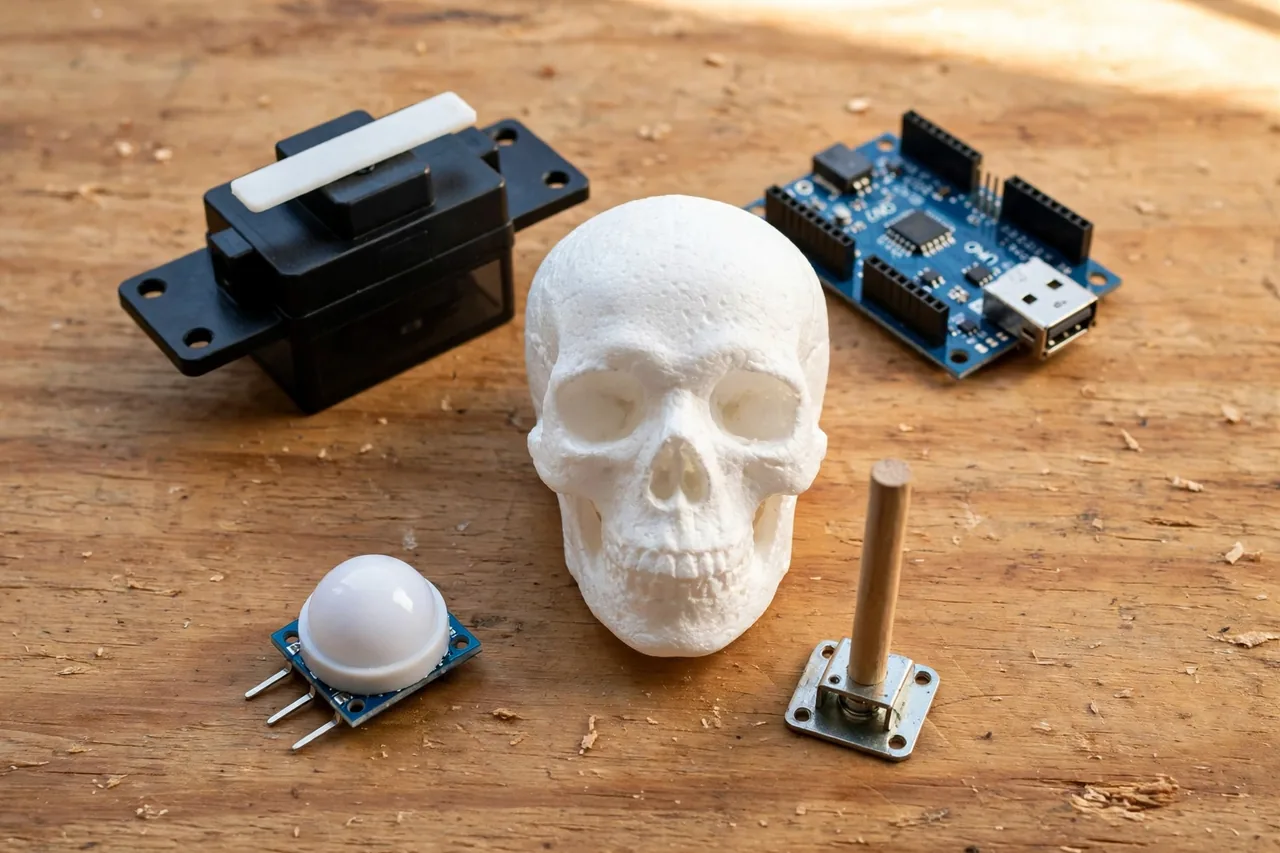
An animatronic is a figure or prop that moves by machine power instead of by hand. Theme parks use large ones with many motors. Yours uses the same basic recipe, just much smaller — four parts that every animatronic, big or small, has.
- The frame holds everything up. It is the skeleton under the costume or skin.
- The servo is the muscle. It is a small motor with gears that turns its shaft to an exact angle and holds it there.
- The controller is the brain. A beginner board such as an Arduino Uno tells the servo when to move and how far.
- The trigger is the sense. A PIR motion sensor notices a person nearby and tells the controller to start the show.
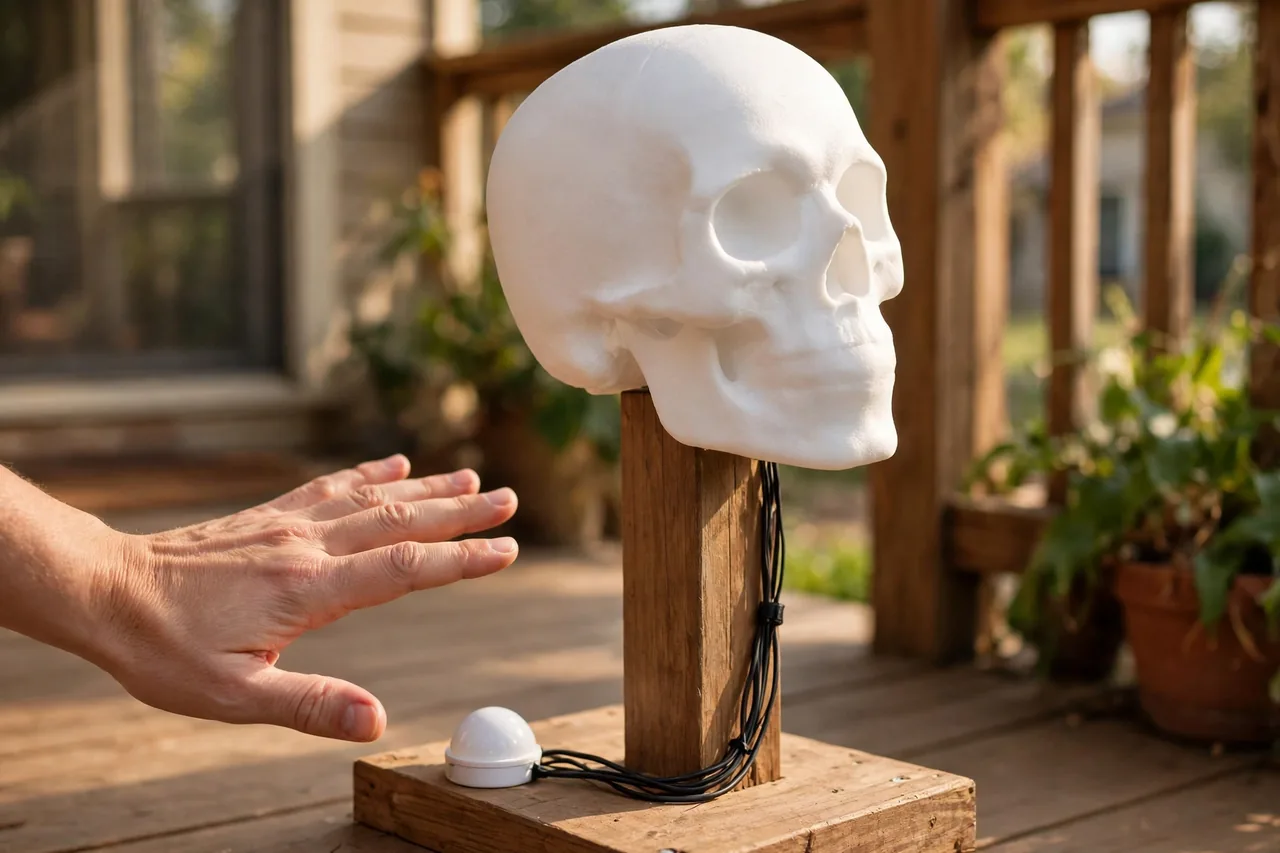
The example build in this guide is a turning head. A foam or plastic head sits on a post. Hidden in the base, one servo turns the post left and right through a short linkage rod. When the PIR sensor sees a visitor, the head turns toward them, pauses, turns the other way, then rests. The same steps work for a rising figure or a waving arm — only the linkage changes.
If this is your first moving prop, resist the urge to add a jaw, blinking eyes, and sound on day one. Each added movement needs its own servo, linkage, and tuning. One clean movement that works every time beats five that jam.
Choose Your One Movement First
The movement you pick decides your parts, frame, and linkage, so choose before you buy anything. All three beginner movements below use one standard servo, the same controller, and the same sensor. They differ in how the servo’s rotation becomes the motion you see.
Beginner movement options compared
| Movement | How it works | Best first prop | Main thing to get right |
|---|---|---|---|
| Turning head | Servo turns a post directly, or pushes a linkage rod side to side | Skull, pumpkin head, doll head | A smooth pivot at the neck so the head never binds |
| Rising figure | Servo horn pulls a rod that lifts a hinged board or lever arm | Ghost or creature popping up from a box or behind a tombstone | Counterweight or light materials, so the servo is not lifting dead weight |
| Waving arm | Servo horn connects to a pushrod that swings a shoulder pivot | Skeleton arm, scarecrow arm, witch hand | A loose, free-swinging shoulder joint with no fabric caught in it |
For a true first build, the turning head is the kindest choice. The servo sits flat in the base, the moving part is light, and a mistake just looks like a stiff neck instead of a collapsed prop. The rising figure is the most dramatic, but lifting weight is where small servos struggle. The waving arm sits between the two.
Whichever you choose, sketch it on paper first: draw the prop, mark where the servo sits, and draw the line the linkage rod will travel. A two-minute drawing prevents the classic discovery that the rod hits the frame — made only after everything is glued.
What You Need: Parts and Tools
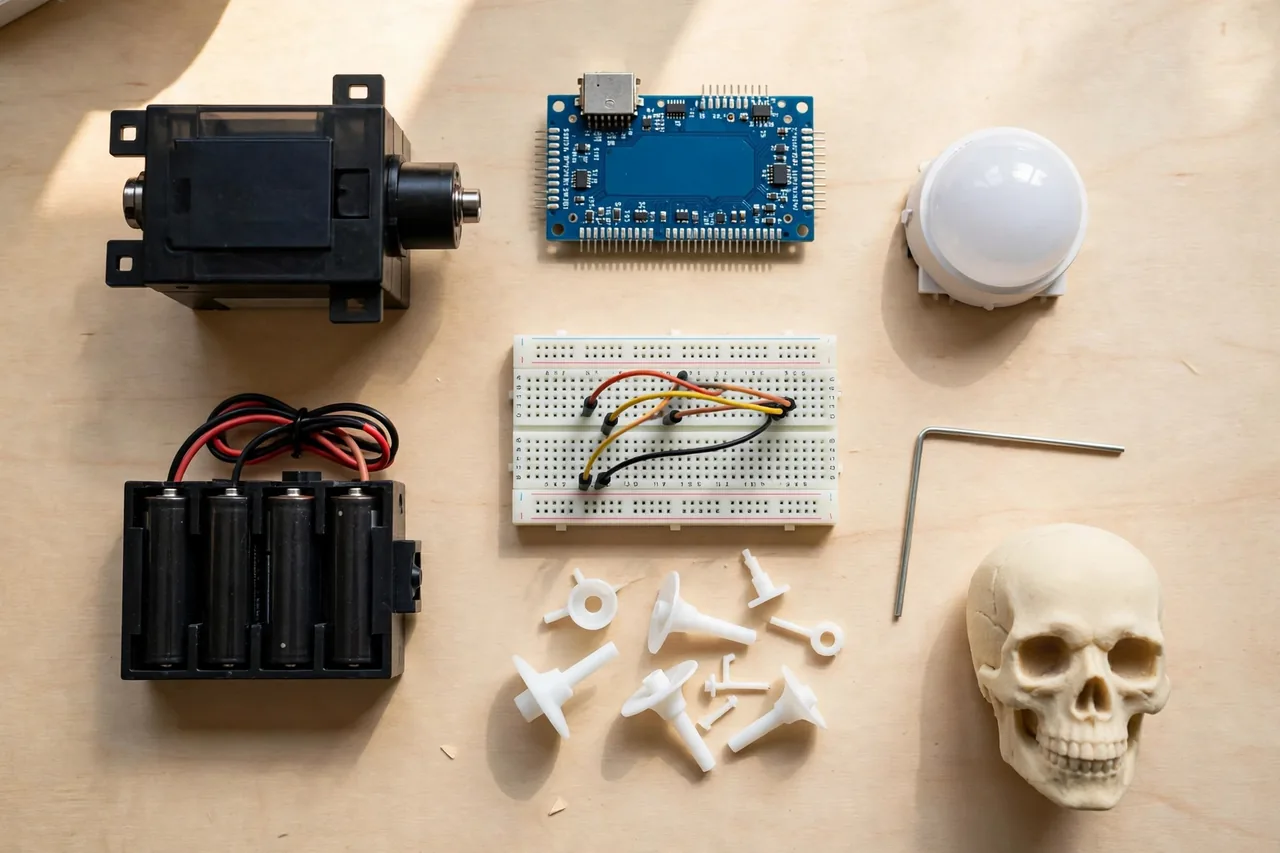
Gather everything before you start. The list is short on purpose, and most of it is standard beginner electronics you can reuse on your next prop.
- One standard-size hobby servo (a micro servo is fine only for a very light foam or paper head)
- One Arduino Uno or similar beginner microcontroller board
- One PIR motion sensor module
- One 4-cell AA battery pack (6 volts) with a switch, for the servo
- A separate battery or USB power source for the controller board
- A small breadboard and jumper wires
- Servo horns (they come in the servo’s bag of parts)
- A short linkage rod: stiff wire, a thin threaded rod, or a zip-tie-and-paperclip pushrod for very light props
- Small ball joints or simple bent-wire loops for the rod ends
- Frame material: foam board, corrugated plastic, thin plywood, or PVC pipe and fittings
- A lightweight head or figure: foam craft head, plastic skull, or a foam pumpkin
- Hot glue gun, craft knife, small screwdriver, wire cutters, and a ruler
- Costume fabric, a mask, or paint to dress the prop
One price you can plan around: Adafruit lists its PIR motion sensor at $10.00 (checked October 23, 2026). Other parts vary too much by brand and bundle to quote honestly, so check current listings when you shop — and buy the servo and battery pack together, because the servo’s power needs decide the pack.
A note on servo size. A servo’s strength is called torque, and it is printed in the servo’s datasheet or listing. A heavier head or a longer lifting arm needs more torque. When in doubt, choose the standard-size servo over the micro: it is the safer muscle for a first build, and it is what the steps below assume.
How a Servo and Linkage Create the Motion
A hobby servo is a small motor and gearbox in a plastic case. You do not tell it to spin. You tell it an angle, and it turns its output shaft to that angle and holds the position with real force. Most hobby servos swing through about 180 degrees, from one side to the other, with the middle at 90 degrees.
Three wires leave the servo. Two carry power, normally 5 to 6 volts of direct current. The third carries the signal: a stream of short pulses from the controller, repeated about every 20 milliseconds. The length of each pulse tells the servo which angle to hold. The controller’s Servo library handles this timing for you, which is why beginners start there.
The servo horn is the small plastic arm that screws onto the shaft. It is the part that actually pushes and pulls. A linkage rod connects a hole in the horn to a point on your moving part. When the horn swings, the rod pushes the part one way and pulls it back. This push-and-pull trick turns rotation into almost any simple motion.
- Rod attached near the center of the horn: small, gentle movement.
- Rod attached at the far hole of the horn: bigger movement, but the servo works harder.
- Rod attached high on the prop’s pivot arm: more travel. Attached low: more force.
Servo Magazine’s long-running animatronics builds use this same setup, with threaded rod and ball joints as the link, because it is cheap, adjustable, and strong. Ball joints let the rod ends swivel, so the linkage never fights itself at an angle; bent wire loops do the same job on light foam props. Either way, every joint in the chain must move freely before the servo is asked to push it.
Build the Frame and Mount the Servo
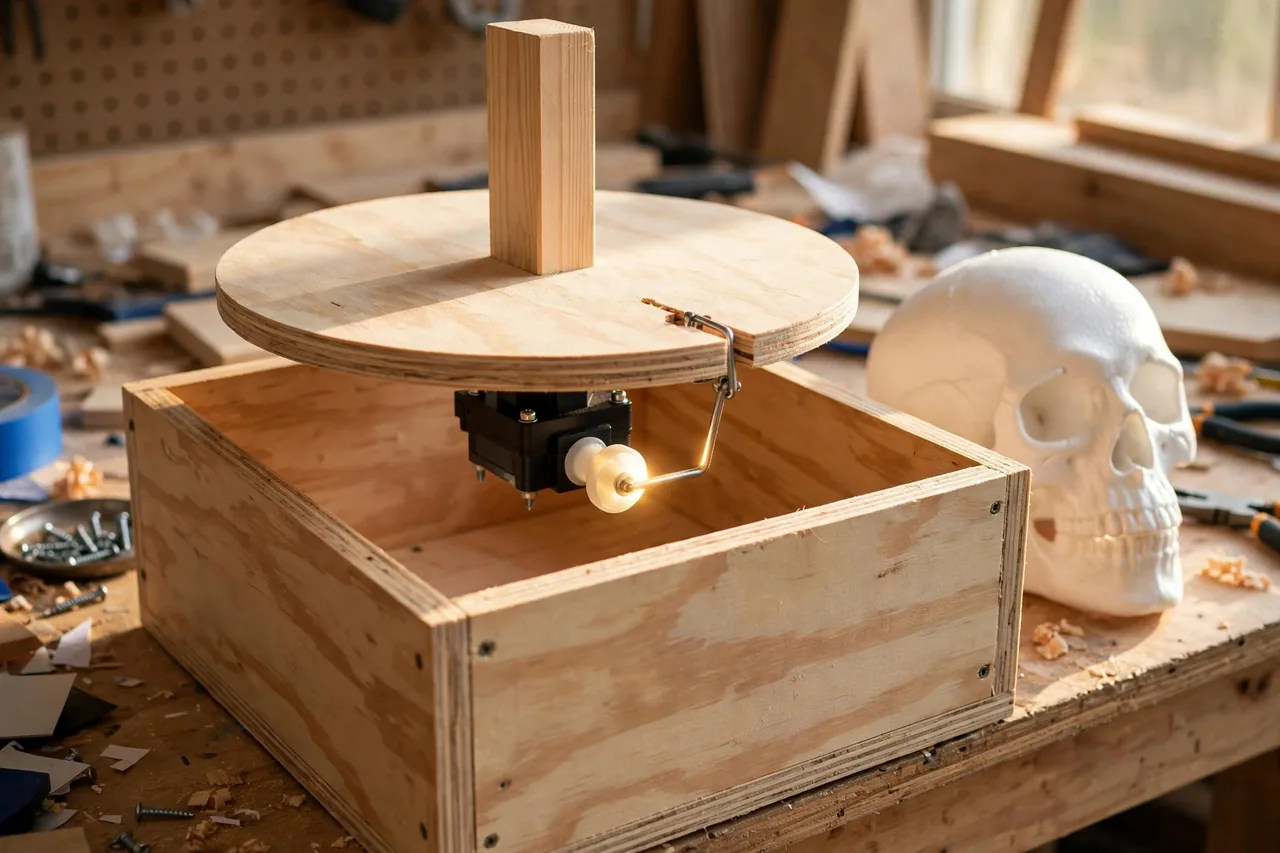
Build the skeleton first, with no electronics attached. A bare frame you can test by hand saves you from debugging mechanics and wiring at the same time.
- Build a base box or stand from foam board, plywood, or PVC. It must be wide and heavy enough that the prop cannot tip when the head turns or the figure rises.
- Fit the moving part. For a turning head, fix a vertical post to a flat pivot plate and rest the plate on the base so it spins freely, like a lazy Susan. It should turn with one finger, with no scraping.
- Attach the head to the post, and keep it as light as you can — hollow foam heads are ideal. Every gram you remove is work the servo never has to do.
- Mount the servo under or behind the pivot, fixed firmly to the frame with its screws. The servo body must not move at all. Only its horn moves. A servo that wiggles in its mount wastes its strength shaking itself.
- Screw the longest horn onto the servo shaft. Connect your linkage rod from a horn hole to a point on the pivot plate or arm, a little off-center. For a turning head, attach the rod about an inch from the center of the pivot.
- Turn the pivot by hand through its full swing. Watch the rod. It should push and pull smoothly, never bend, never pop off, and never push the prop past where it wants to stop.
Stop here and be honest about friction. If the mechanism feels stiff in your hand, the servo will strain, buzz, and run hot. Loosen the pivot, straighten the rod, or move the rod’s attach point closer to the pivot center. Ten minutes of hand-testing now is the cheapest fix in the whole project — and this order, mechanics first and electronics second, keeps you from chasing “electrical” problems that were really a bent rod.
Wire It Up: Servo, Sensor, and Safe Battery Power
This build stays in the safe low-voltage world: the servo runs on a 6-volt battery pack, the sensor runs on the controller’s power, and there is no wall-outlet wiring anywhere in the moving system. Keep it that way.
Caution before you wire: never power a working servo from the controller board’s 5-volt pin or from your computer’s USB port. A servo under load can draw more current than that pin can give, which can reset the board or damage it — a warning repeated in published Arduino prop builds. Give the servo its own battery pack, as below.
- Connect the servo’s power wire (usually red) to the positive wire of the 4-cell AA battery pack. Connect the servo’s ground wire (usually black or brown) to the pack’s negative wire.
- Connect the servo’s signal wire (usually orange, yellow, or white) to pin 9 on the controller board.
- Connect the battery pack’s negative wire to the controller’s GND pin as well. This shared connection is called a common ground, and the signal cannot work without it. It is the single most-missed wire in first builds.
- Connect the PIR sensor’s power pin to the controller’s 5V pin, its ground pin to GND, and its output pin to pin 2 on the controller.
- Power the controller board itself from its own source — a USB cable during setup, or a separate battery for the finished prop.
- Double-check every wire against this list before switching the battery pack on. Reversed power wires can kill a servo or a sensor in a second.
How the PIR sensor works, in plain terms: it watches for changes in infrared heat. A warm body crossing its view changes the heat pattern, and the sensor sends its output pin high. Adafruit’s guide for the common PIR module puts its range at up to about 20 feet (6 meters), across a wide cone — plenty for a porch or hallway scene. You can read more in Adafruit’s PIR motion sensor guide. Keep the sensor’s white dome uncovered and pointed at the path visitors walk — the dome is its eye, and a sensor hidden behind fabric or glass will miss people.
Program the Movement and the Trigger
You need no coding experience to start. The Arduino software includes a ready-made example called Sweep, filed under the Servo examples, which swings a servo back and forth. Upload it first, with the linkage disconnected, and watch the horn swing. That test proves your wiring and power are right before the prop is involved.
Then reconnect the linkage and replace Sweep with a trigger program. The logic fits in four plain steps:
- The controller watches pin 2, where the PIR sensor reports.
- When the pin goes high, a visitor is there, so the controller runs the routine.
- The routine writes angles to the servo: turn one way, pause, turn the other way, pause, return to center.
- The controller waits a few seconds, so the prop does not restart while the same visitor is still standing there.
A short working sketch looks like this. Type it into the Arduino software and upload it:
#include <Servo.h>
Servo propServo;
const int pirPin = 2;
const int servoPin = 9;
void setup() {
propServo.attach(servoPin);
pinMode(pirPin, INPUT);
propServo.write(90);
}
void loop() {
if (digitalRead(pirPin) == HIGH) {
propServo.write(40);
delay(1200);
propServo.write(140);
delay(1200);
propServo.write(90);
delay(3000);
}
}
The numbers are yours to tune. The angles 40, 140, and 90 are the two turn positions and the resting center. The delays are milliseconds: 1200 is a pause of 1.2 seconds. If the head turns too far and strains at the ends, narrow the angles toward the center, for example 60 and 120, until the motion looks easy.
One upgrade makes any animatronic look twice as alive: move in small steps. Instead of jumping straight from 90 to 140, write the angles in a short staircase — 95, 100, 105 — with a tiny delay between each. Real heads speed up and slow down; they do not teleport between positions. This easing trick costs five extra lines and removes the robotic snap that gives cheap props away.
Test, Tune, and Fix the Common Problems
Test in this order: servo alone, servo with linkage, full prop with sensor — and change one thing at a time. When something misbehaves, find your symptom below and start with the first fix, always the safest and cheapest.
Common first-build problems and fixes
| Problem | Likely cause | Fix, in order |
|---|---|---|
| Servo jitters or the board keeps restarting | Servo is sharing the controller’s power, or the batteries are weak | Give the servo its own battery pack; fit fresh batteries; confirm the common ground wire |
| Servo buzzes and strains at the ends of the swing | Angles are wider than the linkage allows | Narrow the angles in the sketch toward the center until the buzzing stops |
| Movement is weak or stalls halfway | Prop is too heavy, or the pivot is stiff | Lighten the moving part; free the pivot; move the rod closer to the pivot center; use a stronger standard servo |
| Prop triggers when nobody is there | Sensor is seeing heat changes: pets, heaters, warm air vents, sun patches | Re-aim the sensor; move it away from heat sources; lower its sensitivity if your module has the small adjustment knob |
| Prop never triggers | Sensor output wired to the wrong pin, or the dome is covered | Check the output wire is on pin 2; uncover the dome; wave a hand close to the sensor to test |
| Rod pops off or bends | Rod ends cannot swivel, so the linkage binds at an angle | Fit ball joints or bent-wire loops at both ends; shorten the swing |
Two habits separate reliable props from frustrating ones. First, run the finished prop for fifteen minutes before the big night: weak batteries, a loosening horn screw, and a rod slowly working itself off all show up in a quarter hour, not in a ten-second test. Second, re-tighten the horn screw after that run — a loose horn is the classic cause of a prop that “worked yesterday.”
If you later want lights to trigger with the same sensor, our guide to light automation for your home shows what motion sensing can do around the house all year, not just in October.
Dress the Prop and Hide the Mechanics

The costume sells the illusion, but it must never fight the machine. Dress the prop last, after all testing, and follow three rules.
- Keep fabric, wig hair, and loose costume edges clear of the horn, the rod, and the pivot. One caught thread can stall a servo all evening.
- Leave the battery pack and the switch reachable. You will change batteries and switch the prop off at night. Burying the pack inside a glued base guarantees a torn costume later.
- Hide the sensor in plain sight. The PIR dome can peek through a gap in a tombstone, a knothole in a crate, or the mouth of a pumpkin. Just never cover the dome itself.
Set the finished prop where visitors pass within the sensor’s range, roughly arm’s length to about 20 feet away. Aim the head’s resting position slightly off the walkway, so the turn toward the visitor reads clearly: a head that starts facing the path and turns away looks broken, but a head that turns to face you looks alive.
For the rest of your scene, our DIY haunted house props guide covers the walk-through scares this animatronic can star in, and our DIY Halloween props guide has standalone builds — tombstones, ghosts, and spiders — that pair well with one moving centerpiece.
Disclaimer: This build uses low-voltage battery power only. Do not connect a homemade prop to wall-outlet power, and do not use damaged or swollen batteries. Keep batteries and electronics dry and out of reach of small children, and switch the prop off when no one is around to enjoy it.
Related Guides
- DIY Haunted House Props — build the walk-through scenes your animatronic performs in.
- DIY Halloween Props — tombstones, ghosts, and spiders to build around your moving prop.
- DIY Scary Halloween Decorations — lighting and ambience that make one movement feel like a full haunt.
- How to Make a Halloween Wreath — a no-electronics project for the same door your prop guards.
- Light Automation for Your Home — motion sensors and triggers put to work all year round.
Frequently Asked Questions
What servo is best for beginners?
A standard-size rotary hobby servo is the safest first choice. It is strong enough for a foam head, an arm, or a light rising figure, and its size makes the horn and linkage easy to handle. Save micro servos for very light paper or foam parts, and check the torque rating in the listing before you buy.
Should I use linear or rotary servos?
Use a rotary servo for almost every first build. Rotary servos swing an arm, and a simple linkage rod turns that swing into a turn, a lift, or a wave. Linear servos push and pull in a straight line. They suit special sliding motions, but they cost more and are harder for a beginner to mount.
How do PIR motion sensors work?
A PIR sensor watches infrared heat, the warmth that people and animals give off. When a warm body crosses its view, the heat pattern changes, and the sensor sends a signal. The common hobby module can sense motion up to about 20 feet (6 meters) away. It cannot tell who is there, only that something warm moved.
What is the main control board used for this animatronics project?
This build uses an Arduino Uno, a beginner microcontroller board. It reads the PIR sensor on pin 2, and it sends angle commands to the servo on pin 9 using the built-in Servo library. The board stores your sketch and runs it every time power is connected, with no computer attached.
How is the head servo linked to the head for motion?
A linkage rod joins the servo horn to a point on the head’s pivot plate, a little off-center. When the horn swings, the rod pushes the plate one way and pulls it back, so the head turns. Ball joints or bent-wire loops at the rod ends let everything swivel freely, which keeps the motion smooth and quiet.
Your First Moving Prop, One Evening at a Time
Start this weekend with the servo, the board, and the Sweep example on your kitchen table. Get the horn swinging, then build the frame, then add the linkage, then the sensor. Each stage is a small win, and each one can be tested before the next begins.
By the time your foam head turns to greet its first visitor, you will own the skill every animatronic builder builds on: turning a motor’s spin into a believable movement. Add a second motion next season. This season, make one movement perfect.