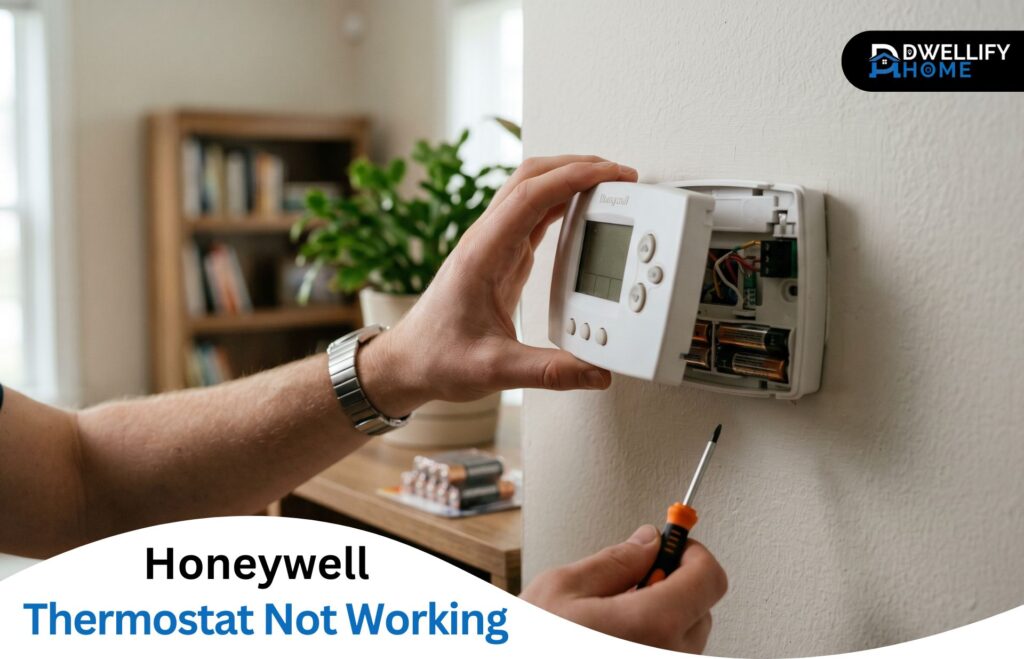
A blank Honeywell screen on the coldest night of the year has a way of making you panic faster than almost any other home issue. After two decades of pulling these units off walls and walking homeowners through quick fixes over the phone, I can tell you most problems trace back to a small handful of predictable causes — usually ones you can solve in minutes.
This guide walks through what actually goes wrong with a honeywell thermostat not working, how to diagnose it without guesswork, and the moment you should stop tinkering and bring in a technician.
The Short Answer
A Honeywell thermostat not working usually points to dead batteries, a tripped breaker, loose wiring, or an open furnace door. Most issues are quick fixes once you identify the symptom and your specific model.
Mission Statement
At Dwellify Home, we help homeowners make practical, informed, and confident decisions about their living spaces — from everyday home solutions and modern interiors to gardens, outdoor areas, and property essentials. Our goal is simple: clear, trustworthy guidance that makes home life easier.
Quick Diagnostic Checklist Before You Begin
Before pulling anything apart, run through these five quick checks:
- Are the batteries low or dead?
- Is the thermostat set to “Heat” or “Cool” with the right setpoint?
- Is the breaker for your HVAC system tripped?
- Is the furnace door fully closed (a small safety switch sits behind it)?
- Is the thermostat firmly seated on its wall plate?
Nine times out of ten, one of these answers the problem before it ever becomes a service call.
Common Causes at a Glance
| Symptom | Most Likely Cause | First Fix to Try |
| Blank screen | Dead batteries or tripped breaker | Replace batteries, check breaker |
| No heat | Furnace door open or W-wire loose | Reseat door, check wiring |
| No AC | Compressor delay or jumper issue | Wait 5 minutes, check R/Rc jumper |
| Won’t connect to Wi-Fi | 2.4 GHz network mismatch | Separate 2.4 GHz from 5 GHz |
| Blank after battery change | Wrong polarity or corroded contacts | Reinstall correctly, clean terminals |
Key Things to Check First
- Battery condition and polarity
- Circuit breaker for the HVAC system
- Furnace door panel and power switch
- Thermostat mode (Heat / Cool) and setpoint
- C-wire connection on smart Wi-Fi models
Identify Your Honeywell Thermostat Model First
The fix changes based on the model. A 1990s round dial doesn’t troubleshoot the same way a Wi-Fi smart thermostat does, and treating them the same wastes time.
Analog and Mechanical Models
These are the older round or rectangular units with a manual dial or slider. No screen, no batteries — just direct wiring. Issues here are almost always about wiring contacts, dust buildup, or the unit being out of level.
Digital and Programmable Models (RTH, Pro Series)
The RTH series and the Pro 2000/3000/4000 line run on AA or AAA batteries (sometimes hardwired with battery backup). Most “blank screen” complaints come from this group.
Smart Wi-Fi Models (T5, T6, T9, T10, VisionPRO, Lyric)
These rely on a C-wire for steady power and connect to your home network through the Honeywell Home or Resideo app. Their problems usually involve power, Wi-Fi pairing, or app sync — not just batteries.
Why Knowing Your Model Changes the Fix
A T6 with no display almost always points to a missing or weak C-wire. A 30-year-old mercury-switch model with the same symptom usually just needs cleaning. Same problem on the surface — completely different fix underneath.
Common Reasons a Honeywell Thermostat Stops Working
Across thousands of service calls, the same six causes show up over and over.
Dead or Weak Batteries
Even hardwired thermostats often use AA or AAA batteries for backup. When they get low, the screen dims, the unit glitches, and sometimes it shuts off entirely. Replace them once a year — daylight saving time is a good reminder.
Tripped Circuit Breaker or Blown Fuse
A blank screen with no battery warning often means the breaker for your furnace or air handler has tripped. There’s also a low-voltage fuse on the furnace control board that can blow during a wiring short.
Loose or Damaged Wiring
Wires loosen over time, especially after thermostat upgrades or wall repaints. A wire that’s slipped a millimeter out of its terminal can kill power to the entire unit.
Open Furnace Door (Safety Switch Activated)
This one catches more homeowners than you’d expect. Most furnaces have a plunger switch behind the door panel — if the door isn’t seated tightly, the switch stays open and the system won’t run no matter what the thermostat says.
Missing or Faulty C-Wire
The C-wire (common wire) provides constant 24V power to smart thermostats. If your old thermostat didn’t use one but you upgraded to a T6 or T9, the new unit may be running on stolen power and cutting out randomly.
Aging Thermostat Reaching End of Lifespan
Honeywell thermostats are built well, but nothing lasts forever. After 10 to 15 years, internal components drift and reliability drops.
Honeywell Thermostat Has a Blank Screen or No Light
A blank screen is the most common symptom I get called about. The fix is usually one of five things, in this order.
Replace the Batteries (Even on Hardwired Models)
Pop out the batteries, install fresh alkaline ones, and confirm polarity. Avoid lithium or rechargeable types unless your model specifically allows them.
Reseat the Thermostat on Its Wall Plate
Pull the front cover off and press it firmly back onto the base. A loose mount breaks the contact between the faceplate and the wiring terminals.
Clean Corroded or Loose Battery Contacts
If batteries leaked or sat too long, the spring contacts corrode. A cotton swab dipped in white vinegar clears it up. Let everything dry before reinstalling.
Check the Circuit Breaker and Furnace Switch
If the unit is hardwired, no battery in the world fixes a tripped breaker. Walk to the panel, then check the small power switch on the side of the furnace — it looks like a regular light switch and gets bumped off more often than people realize.
What to Do If the Screen Stays Blank After New Batteries
At this point you’re likely looking at a low-voltage fuse on the furnace control board, a missing C-wire, or a failed thermostat. This is where a multimeter or a technician earns their keep.
Honeywell Thermostat Not Turning On Heat
The screen works, but no heat is coming through. Run these checks before assuming the furnace itself is the problem.
Confirm Heat Mode and Set Point Are Correct
Make sure the thermostat is set to “Heat” — not “Off” or “Auto” with a low setpoint. The set temperature must be a few degrees above the current room reading.
Check the Furnace Power Switch and Door
If the panel is loose or the switch is off, you’ll see “Heat On” on the screen but nothing will happen at the furnace.
Inspect Air Filters and Airflow
A clogged filter chokes airflow, triggers a high-limit shutoff, and locks the furnace out. If you can’t see light through your filter, replace it.
Verify Wiring on the W and R Terminals
W controls the heat call, R provides power. Both need to be tight. A loose W wire is one of the most common no-heat causes I find on calls.
Watch for Furnace Safety Lockouts
Modern furnaces lock out after several failed ignitions. You’ll often see a flashing LED on the control board through the inspection window. That’s a code — write it down before resetting power.
Honeywell Thermostat Not Turning On the AC
Cooling problems follow a similar pattern, with one extra wrinkle.
Confirm Cool Mode and Set Point Are Correct
The thermostat must be in “Cool” mode with a setpoint below the current room temperature. A “Cool On” message should appear on the display.
Understand the 5-Minute Compressor Delay
Many homeowners panic too early here. Honeywell thermostats deliberately delay the compressor for up to five minutes after a power cycle to protect it. If you see “Cool On” blinking, that’s the delay running. Wait it out.
Check Y, G, R, and Rc Terminal Wiring
Y signals the compressor, G runs the indoor fan, R/Rc power the unit. The R-Rc jumper has to be set correctly — if your system has only one transformer, that jumper must be in place.
Inspect the Outdoor Compressor and Indoor Blower
If the outdoor unit hums but doesn’t start, you may have a bad capacitor — that’s a job for a technician. If the compressor runs but no air blows inside, the blower motor or its capacitor is the suspect.
Honeywell Thermostat Not Working After a Battery Change
This catches more people than any other scenario, and the fix is rarely the unit itself.
Use the Right Battery Type and Polarity
Honeywell models use 1.5V alkaline AA or AAA. Confirm the + and – orientation against the markings inside the compartment. One backwards battery and the screen stays dark.
Avoid Mixing Old and New Batteries
Always replace all batteries at once with the same brand. Mixing voltages confuses the thermostat’s power circuit.
Clean Battery Terminals for Corrosion
A cotton swab and a drop of white vinegar handles light corrosion. For heavier buildup, fine-grit sandpaper on the spring contacts brings them back to bare metal.
Try the Reverse-Polarity Reset Trick
This is an old field trick that still works on most digital Honeywell models. Insert the batteries backwards for ten seconds, then reinstall them correctly. It clears soft glitches without a full reset.
Perform a Full Factory Reset If Needed
If the unit still won’t behave, a factory reset wipes settings and starts fresh. Specific steps vary by model — covered further down.
Honeywell Thermostat Not Working with No Error Code
Sometimes nothing’s wrong on the screen, but the system still won’t run. These are the silent killers.
Power Issues That Don’t Trigger an Alert
A weak C-wire connection can deliver enough voltage to power the screen but not enough to trigger relays. The thermostat looks fine while doing nothing.
Stuck Hold, Vacation, or Schedule Override
Check for “Hold,” “Permanent Hold,” or “Vacation” on the display. These override your normal schedule and can lock the system at an odd setpoint.
Sensor Misreading or Calibration Drift
Place a separate room thermometer beside the unit. If readings differ by more than two degrees, the internal sensor has drifted and the system may be cycling at the wrong times.
Utility Saver’s Switch or Demand-Response Cycling
If you’re enrolled in a utility savings program, your AC may be cycled off remotely during peak hours. The thermostat won’t show an error — it just waits.
Wi-Fi Smart Honeywell Thermostat Not Connecting or Responding
Smart models bring extra failure points. Most issues live in the network or the app, not the thermostat.
Honeywell Home / Resideo App Issues
Force-close the app and reopen it. Sign out and back in. If your account shows “device offline,” the thermostat itself has lost its Wi-Fi connection.
Router and Network Troubleshooting
Honeywell smart thermostats only work on 2.4 GHz Wi-Fi. If your router auto-merges 2.4 and 5 GHz under one name, you may need to separate them temporarily during pairing.
Re-pairing the Thermostat to Its Receiver
For wireless models with a separate boiler receiver (common on UK Honeywell setups), put both into pairing mode and re-bind them. The manual lays out the exact button sequence.
Firmware Updates and App Reinstallation
Outdated firmware causes random disconnects. The app pushes updates automatically when the device is online — sometimes you just need to leave it powered overnight.
Old Honeywell Thermostat Not Working: Extra Things to Check
Older units have their own personality.
Clean Dust From Mechanical Contacts
Open the cover and gently brush dust off the internal contacts and bimetallic strip. A clean strip moves freely and registers temperature accurately.
Level the Unit (For Mercury-Switch Models)
Mercury-switch thermostats must sit perfectly level on the wall. A tilted unit gives false readings and short-cycles the system. A small bubble level on top of the base solves it.
Tighten Loose Screw Terminals
Decades of expansion and contraction loosen terminal screws. A small flathead screwdriver and a quick snug-up often brings a “dead” old unit right back.
Recognize When an Older Unit Has Reached End of Life
If you’ve cleaned, leveled, and tightened it, and it still misbehaves, it’s done. Replacement is cheaper than continuing to chase ghosts.
How to Reset a Honeywell Thermostat the Right Way
Resets clear soft glitches that troubleshooting can’t reach.
Reset Steps for Programmable Models
Press and hold the “System” button while pressing the center blank button (or “Run”) for five seconds. Release, and the unit reboots.
Reset Steps for Smart Wi-Fi Models (T5, T6, T9)
Open the menu, scroll to “Preferences” or “Reset,” and choose “Factory Reset.” Re-add the device to your Honeywell Home app afterward.
Resetting Through the Circuit Breaker
Turn off the breaker for your HVAC system, wait 30 seconds, and turn it back on. This is the cleanest reset for hardwired units.
What a Factory Reset Will and Won’t Erase
A factory reset clears Wi-Fi credentials, schedules, and Home/Away settings. It does not touch HVAC wiring or the system itself.
Honeywell Thermostat Error Codes and What They Mean
Common codes worth recognizing:
- Code 89 / 168 — Server or device communication failure
- Code 171 / 173 — Wi-Fi credentials lost
- “No Connection” — Lost contact with the Honeywell server
- “Aux Heat On” — Backup heat strips engaged on a heat pump
- “LO BAT” or low-battery icon — Replace batteries soon
- Flashing snowflake — Compressor delay active
When in doubt, your model’s manual lists every code with the exact fix.
Preventive Maintenance to Keep Your Thermostat Working
A thermostat is one of the cheapest pieces of your HVAC system, but it controls the most expensive parts. A little care goes a long way.
Annual Battery Replacement
Replace batteries once a year, even if they still look fine. The cost of fresh AAs beats a midnight no-heat call.
Cleaning the Display and Internal Sensors
A soft, dry cloth on the screen and a quick puff of compressed air through the internal vents keeps sensors reading accurately.
Smart Placement Away From Heat and Drafts
A thermostat near a sunny window, kitchen, or supply vent will never read your home’s true temperature. If yours is in a bad spot, relocation is a worthwhile project.
Routine HVAC System Check-Ups
A yearly tune-up catches loose wires, weak capacitors, and dirty contacts before they take the thermostat down with them.
When to Stop Troubleshooting and Call a Professional
DIY has limits, and knowing where they are is part of doing this safely.
Signs of Wiring Damage or Electrical Faults
Burnt smell, scorched terminals, or melted insulation are immediate stop signs. Cut power and call a tech.
Repeated Breaker Trips or Blown Fuses
A breaker that trips once is a glitch. A breaker that trips twice is a warning. Don’t keep resetting it.
Voltage Readings Outside the 20–30 VAC Range
Your thermostat needs steady 20–30 volts AC across the R and C terminals. Anything outside that range points to a transformer or control-board issue beyond DIY range.
Persistent Issues After a Factory Reset
A factory reset is the deepest DIY tool you have. If problems return immediately afterward, the thermostat or its wiring has hardware-level damage.
Should You Repair or Replace Your Honeywell Thermostat?
Sometimes the smarter call is replacement.
How Long Honeywell Thermostats Typically Last
Most Honeywell models run 10 to 15 years. Mechanical units can stretch to 20+, while smart Wi-Fi models often get replaced sooner due to changing tech, not failure.
Repair Cost vs. Replacement Cost
A new mid-range Honeywell thermostat costs less than an hour of HVAC service in many areas. If a repair quote approaches that number, replacement makes more sense.
When Upgrading to a Smart Model Makes Sense
If your current unit lacks scheduling or remote control, an upgrade to a T6 or T9 pays back through energy savings within a couple of years for most households.
Frequently Asked Questions
Why is my Honeywell thermostat showing no light at all?
A completely dark Honeywell thermostat usually means no power is reaching the unit. Check the batteries first, then the circuit breaker for your HVAC system, then the small power switch on the furnace itself. If all three look fine, you may have a blown low-voltage fuse on the furnace control board.
Can a Honeywell thermostat work without batteries?
Yes, but only if the model is fully hardwired with a C-wire providing constant 24V power. Most digital and programmable Honeywell models still rely on batteries for backup, even when wired. Smart Wi-Fi models like the T6 Pro need the C-wire and don’t use batteries at all.
How long do Honeywell thermostat batteries usually last?
Most Honeywell thermostat batteries last 8 to 12 months under normal use. Heavy backlight use, frequent menu access, and lower-quality batteries shorten that window. Plan a yearly replacement and you’ll rarely see a low-battery warning catch you by surprise.
Why is my Honeywell thermostat blank with new batteries?
This usually points to incorrect battery polarity, mixed old and new cells, or corroded battery contacts. If the display stays blank after confirming all three, the issue is likely a tripped breaker, a missing C-wire, or a blown fuse on the furnace control board rather than the batteries themselves.
How do I know if my Honeywell thermostat is broken?
A broken Honeywell thermostat usually shows a permanently blank screen even with fresh batteries and a good breaker, a frozen or flickering display, ghost button presses, or an inability to hold settings after a factory reset. If basic troubleshooting doesn’t bring it back, the internal board has failed.
Conclusion
A Honeywell thermostat not working rarely means catastrophe — most of the time it’s a battery, a breaker, a loose wire, or a furnace door that didn’t latch. Work through the simple checks first, identify your model so you fix it the right way, and don’t hesitate to bring in a technician once you’re past wiring or voltage territory. Acting early protects the rest of your HVAC system, keeps your home comfortable, and saves you from the kind of repair bill nobody wants.
Disclaimer
The information shared in this article is for general informational purposes only. Individual situations, equipment models, and home conditions can vary, so results may differ from one household to another. For complex wiring, electrical, or HVAC concerns, we recommend consulting a qualified professional.